CART
The GovRAMP Security Snapshot is the programme’s entry point: a Program Management Office assessment of a cloud product against 40 NIST SP 800-53 Rev. 5 controls that produces a maturity score out of 100, delivered in a letter about three weeks after intake, and shown to nobody unless the provider chooses to share it. It comes in two forms. The Single Security Snapshot is a one-time score for $1,000 to $2,500 in PMO fees plus membership; the Progressing Security Snapshot Program is a subscription — $750, $1,000 or $1,600 a month by revenue tier — with quarterly rescoring, monthly advisory calls and a public listing on the Progressing Product List.
Since 1 January 2026 the Progressing programme has required a score above zero to be listed and expected improvement at every quarterly snapshot. This guide sets out what the score measures and how it is weighted, the two forms and their process steps, what governments do with it, the 2026 rules, and when a provider should skip the Snapshot and go straight to a verified status.
The Snapshot criteria and scoring were updated on 1 January 2024 to align with baselines based on NIST SP 800-53 Rev. 5 and the MITRE ATT&CK framework’s control protection values. GovRAMP states that the criteria “include the highest scoring MITRE ATT&CK control protection values from GovRAMP’s Minimum Mandates for Ready (Rev. 5)”, that scoring is weighted by the protection value assigned to each control, and that the result is a percentage out of 100.
The FAQ adds three things the score reflects: the control’s impact on readiness to advance through GovRAMP verification, its influence on overall posture, and the visibility the PMO has into it — hosting in a GovRAMP Authorized IaaS environment scores higher because the PMO already sees that platform, and points are available for recognised compliance frameworks, penetration testing and security training programmes. The 40 controls and their weights are published in the Snapshot Criteria Matrix in GovRAMP’s document library. Our guide to GovRAMP status levels sets the Snapshot against the verified statuses above it.
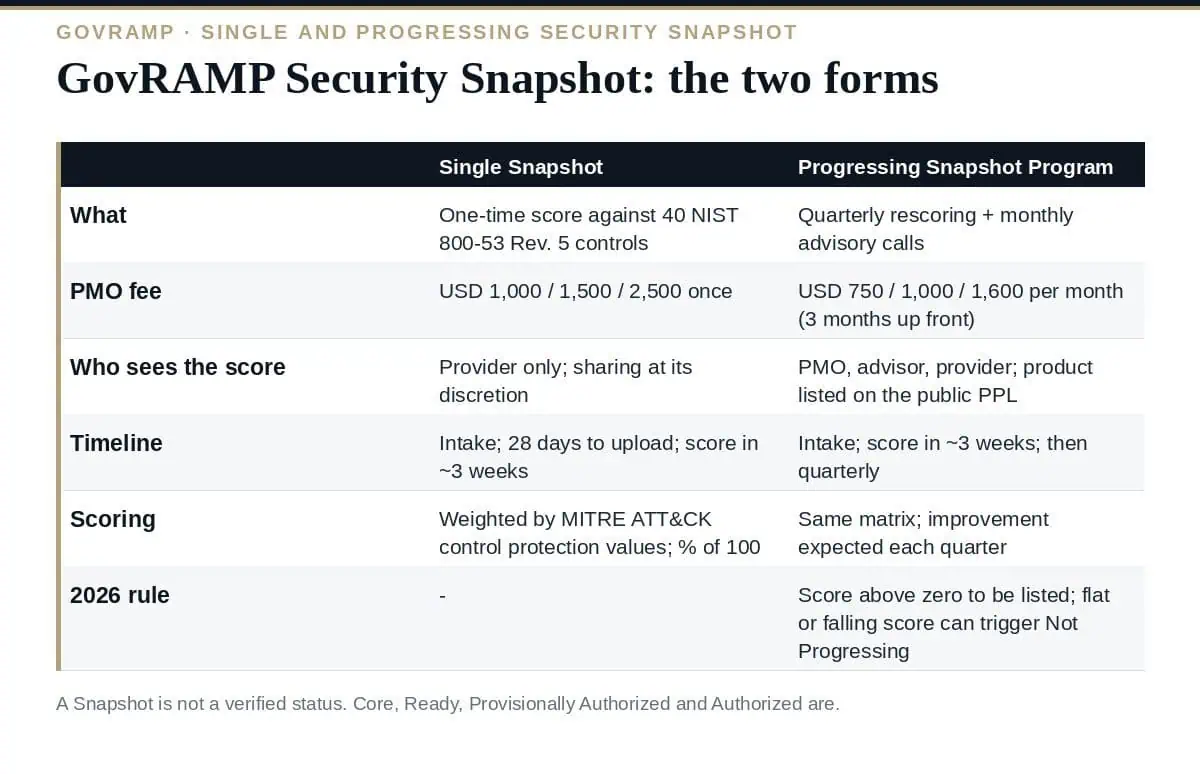
| Single Security Snapshot | Progressing Security Snapshot Program | |
|---|---|---|
| What it is | A one-time, point-in-time assessment with a score and findings report | An ongoing programme with quarterly snapshot scores and monthly advisory calls |
| Cost (PMO fee by revenue tier) | $1,000 / $1,500 / $2,500 once, plus membership | $750 / $1,000 / $1,600 a month, three months paid up front, plus membership — $9,000 / $12,000 / $19,200 a year |
| Who sees the score | The provider only; sharing is at its discretion | The PMO, the assigned advisor and the provider’s contact; the product is listed on the public Progressing Product List, but scores are not published |
| Timeline | Intake meeting; 28 days to upload documentation; score about three weeks later | Intake meeting; score about three weeks later; then quarterly rescoring |
| Best for | Providers early in their security journey, or wanting clarity before committing | Providers who want guided, measurable progress toward Core or Ready |
| Reported outcome | A maturity score and findings | GovRAMP reports participants improve control performance by 40–60% within the first year |
The score is private, but the programme is designed for procurement. GovRAMP’s FAQ states that governments “use the Security Snapshot Program as a tool to assess vendor readiness and risk during the procurement process”, comparing offerings and informing contract requirements, and that providers may disclose their score when a government agency requests it as part of a procurement. The Progressing Product List is the public half: a buyer can see that a product is enrolled and advancing without seeing the number. A Provisionally Authorized product’s interconnected technologies must also hold a current Snapshot under GovRAMP’s authorization boundary guidance, which is a second, less obvious use of the score.
From 1 January 2026 the Progressing Security Snapshot programme tightened: a product must score above zero to appear on the Progressing Product List; snapshots are quarterly with monthly progress calls; and improvement is expected at each snapshot, with an identical or declining score able to trigger escalation and a move to Not Progressing. The practical effect is that a Progressing listing is a commitment to fund remediation every quarter, not a marketing position. A provider that cannot resource that should take a Single Snapshot instead and enter the Progressing programme when it can.
What is the GovRAMP Security Snapshot?
A PMO assessment of a cloud product against 40 NIST SP 800-53 Rev. 5 controls, weighted by MITRE ATT&CK control protection values, producing a maturity score out of 100 delivered in a letter about three weeks after intake. It comes as a one-time Single Snapshot or an ongoing Progressing programme with quarterly rescoring.
Is the score public?
No. Scores are confidential to the provider, the PMO and the assigned advisor; the provider may share them, for example when a government asks during procurement. Progressing programme products are listed publicly on the Progressing Product List without their scores.
How much does it cost?
A Single Snapshot is $1,000, $1,500 or $2,500 in PMO fees by revenue tier plus membership; the Progressing programme is $750, $1,000 or $1,600 a month with three months paid up front.
Is a Snapshot a verified status?
No. Core, Ready, Provisionally Authorized and Authorized are the verified statuses; the Snapshot is a progress measure and an entry point.
What changed in 2026?
Progressing products must score above zero to be listed, snapshots are quarterly with monthly calls, and a flat or declining score can trigger escalation and a Not Progressing status.
Take a GovRAMP Security Snapshot when you need an objective starting point: a Single Snapshot for a private diagnosis, the Progressing programme when you can fund quarterly improvement and want the public listing. Work the published 40-control matrix, evidence every criterion, and treat the score as the map to Core or Ready rather than the destination — the buyers reading the Authorized Product List are looking for a verified status.
The Pursuit Strategy, the Service Boundary definition, the Baseline Crosswalk and the control implementation summaries that evidence the Snapshot criteria are in the GovRAMP (StateRAMP) TX-RAMP Compliance Toolkit, or start with the free templates.

September 20, 2026
September 19, 2026

September 19, 2026

September 19, 2026

September 19, 2026

