CART
GovRAMP Fast Track is the route by which a cloud provider that already holds federal security documentation — a FedRAMP package above all — reuses it for GovRAMP verification instead of producing a second one. The programme’s own phrase is “build once, use everywhere”: Security Assessment Reports, Readiness Assessment Reports and 90 days of continuous monitoring data go to the GovRAMP Program Management Office in FedRAMP formatting, the PMO reviews them for alignment with GovRAMP requirements, and the provider enters continuous monitoring with a verified status.
Five steps, the same fees as the standard process, and one consequence that matters more than the paperwork: for Texas, a GovRAMP Authorized product is synced weekly onto the TX-RAMP list under automatic reciprocity. This guide sets out who Fast Track is for, the five steps as GovRAMP describes them, what the PMO needs and what it does with it, the sponsor question, what the process costs, and the three situations where it delivers less than providers expect.
GovRAMP answers the question directly: Fast Track is “best suited for” providers “with existing federal security documentation, including those participating in FedRAMP or similar programs”. The reasoning is structural. GovRAMP’s Security Program is built on NIST SP 800-53 Rev. 5 and its Federal Overlay aligns GovRAMP impact levels with federal standards including FedRAMP Rev. 5, so a provider assessed at FedRAMP Moderate has already evidenced the bulk of what GovRAMP Authorized requires. Fast Track does not replace the federal requirements — GovRAMP says so — it extends the work to state, local and education buyers. Our guide to GovRAMP vs FedRAMP covers where the two programmes differ.
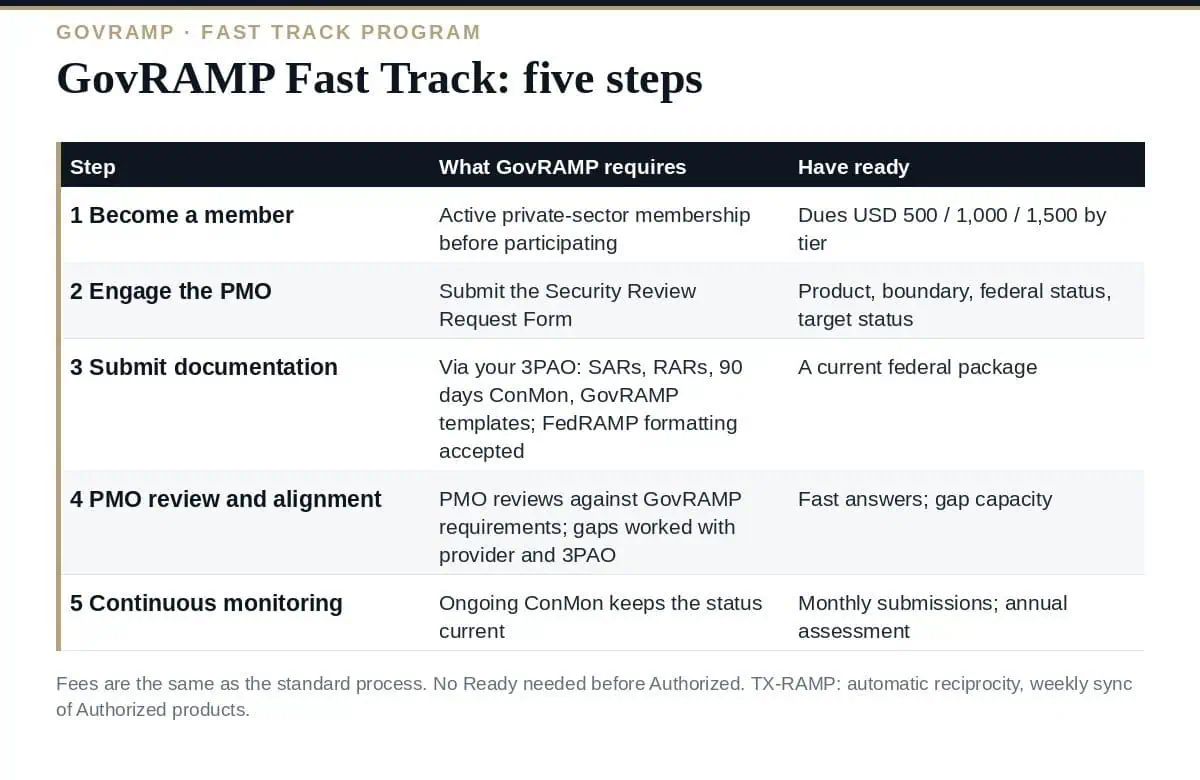
| Step | What GovRAMP requires | What to have ready |
|---|---|---|
| 1. Become a GovRAMP member | All service providers must be active private-sector members before participating | Membership at the tier for your revenue — $500, $1,000 or $1,500 a year — renewing on 1 June |
| 2. Engage the PMO | Submit a Security Review Request Form describing the product and the existing documentation | Product name, boundary summary, current federal status, impact level, target GovRAMP status |
| 3. Submit existing documentation | Work with your 3PAO to provide the federal package: SARs, RARs, 90-day continuous monitoring data and any required GovRAMP templates; the PMO accepts FedRAMP formatting | The federal package as assessed, plus the GovRAMP templates the PMO names |
| 4. PMO review and alignment | The PMO reviews the documentation for alignment with GovRAMP requirements and works with the provider and 3PAO to address gaps | Someone who can answer questions quickly; gap closure capacity |
| 5. Maintain through continuous monitoring | Ongoing ConMon keeps the posture current and visible to government stakeholders | Monthly ConMon submissions for Ready and Authorized; the annual assessment |
Step 3 is the one that decides the GovRAMP Fast Track timeline. The PMO reviews what the 3PAO submits, and a federal package whose SAR is two years old with a thin ConMon trail produces gap questions that a current package does not. The 90 days of continuous monitoring data is a stated input, not a nice-to-have.
Federal packages sometimes contain findings or POA&M items a provider cannot share. GovRAMP’s answer is case by case: the PMO handles restrictions depending on what cannot be shared, notes that a federal agency concerned about federally protected information would probably not want a state agency inside the product boundary anyway, and that state agencies “will require complete security information before allowing state data” into the system. Uploaded packages sit in a document repository that the GovRAMP board and steering committee require to be FedRAMP Moderate authorized, separated by provider, with access limited to the designated provider representative and the PMO.
Two FAQs on the Fast Track page remove common assumptions. A product does not need Ready before Authorized — Fast Track can go straight to the top verified status. And the sponsor for Authorized need not be a state CIO the provider already knows: eligible sponsors are any CIO or designee representing state, local, tribal or territorial government or public higher education, and the alternative is the GovRAMP Approvals Committee, five government officials who meet monthly, review packages and PMO recommendations, and approve authorizations collectively. A federal agency cannot sponsor a GovRAMP authorization. Our guide to GovRAMP status levels covers what each verified status requires.
GovRAMP’s answer is one sentence: “The fees are the same as going through the standard process.” From the published schedule, that means membership plus the PMO fee for the target stage — for Authorized, $4,500, $11,000 or $19,500 a year by revenue tier, so $5,000, $12,000 or $21,000 all in — with 3PAO effort on top. The saving is in that 3PAO effort and in documentation: an alignment engagement on an existing package rather than a full assessment. Our guide to GovRAMP cost sets out every line.
The Fast Track page carries a note for Texas vendors: the 2021 law requires vendors using cloud to serve Texas to be TX-RAMP authorized, TX-RAMP recognises GovRAMP with automatic reciprocity by administrative rule, and GovRAMP runs a weekly sync so its Authorized products appear on the TX-RAMP list. A FedRAMP-authorized provider that completes Fast Track therefore gains Texas without a third process. Our guide to TX-RAMP covers the two levels and the provisional route.
What is GovRAMP Fast Track?
A process that lets providers with existing federal security documentation — FedRAMP SARs, RARs and continuous monitoring data — reuse it for GovRAMP verification. The PMO accepts FedRAMP formatting, reviews alignment with GovRAMP requirements and works with the provider and 3PAO on gaps.
Does it replace FedRAMP?
No. GovRAMP states Fast Track builds on existing federal work and does not replace federal requirements.
Do we need Ready before Authorized?
No. A product does not need Ready before Authorized under GovRAMP.
What does it cost?
The same as the standard process — membership plus the PMO fee for the target stage — with the saving in reduced 3PAO and documentation effort.
Does GovRAMP Authorized cover Texas?
TX-RAMP recognises GovRAMP with automatic reciprocity by administrative rule, and GovRAMP syncs Authorized products to the TX-RAMP list weekly.
Use GovRAMP Fast Track if you hold a current federal package: join, submit the request, hand the PMO your SARs, RARs and 90 days of ConMon through your 3PAO, close the alignment gaps, and keep monitoring. Decide the sponsor route early, expect template requests where the 2026 federal artifacts and GovRAMP’s SSP model differ, and treat the Texas listing as the bonus it is.
The Reciprocity Mapping, the Authorization Pathway, the State Sponsor Engagement Pack, the 3PAO Engagement Pack and the Monthly ConMon Pack are in the GovRAMP (StateRAMP) TX-RAMP Compliance Toolkit, or start with the free templates.

September 20, 2026
September 19, 2026

September 19, 2026

September 19, 2026

September 19, 2026

