
CART
No products in the cart.
ISO Compliance Insights & Best Practices
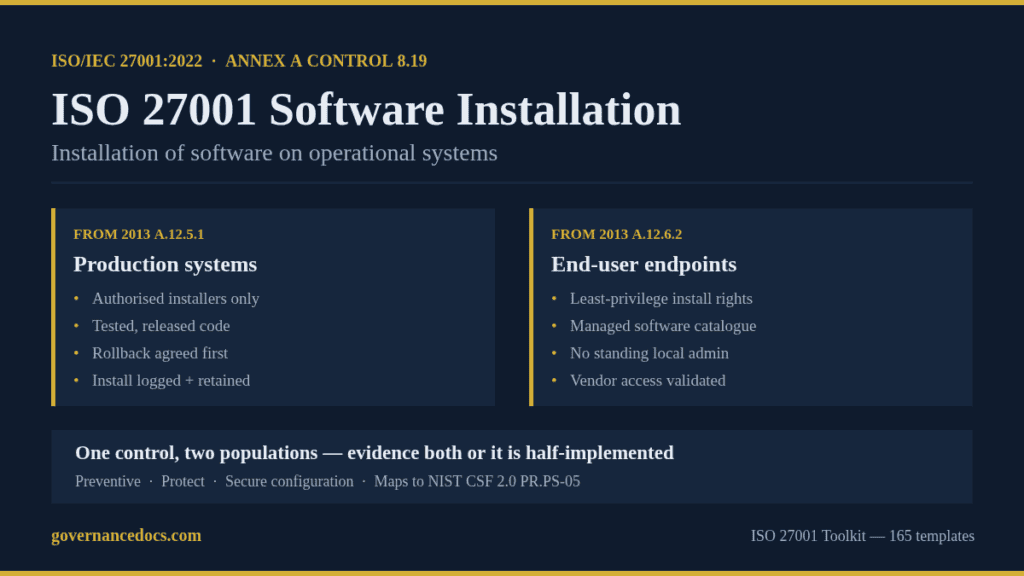
ISO 27001 software installation is governed by Annex A control 8.19, and it is one of the few controls in the 2022 edition that quietly carries two separate obligations. Most Statements of Applicability answer only one of them. The control text reads simply enough — procedures and measures shall be implemented to securely manage software installation on operational systems — but the two 2013 controls it was assembled from pointed at different people, different machines and different evidence. That is where the audit goes sideways.
This guide covers what ISO 27001 software installation requires under A.8.19, the two populations an auditor will sample, where the control stops and change management starts, and the five gaps that most often turn into a nonconformity.
Free gap assessment
Where do you actually stand against ISO 27001?
Score every management system clause and all 93 Annex A controls, free, and get a prioritised gap list back.
Run the free ISO 27001 gap assessment → or View premium report sample
“Operational systems” means the systems that run the business: production servers, the ERP, the payroll platform, the laptops people do their work on. Development and test environments sit outside the control — which is precisely why the control exists, because software has to cross from one to the other at some point, and that crossing is the risk that ISO 27001 software installation controls.
ISO/IEC 27002:2022 gives A.8.19 the following attribute row, which is worth reading because it tells you how the control is meant to behave rather than what it says:
| Attribute | Value for A.8.19 |
|---|---|
| Theme | Technological (one of the 34 technological controls) |
| Control type | Preventive |
| Information security properties | Confidentiality, integrity, availability |
| Cybersecurity concept | Protect |
| Operational capability | Secure configuration |
| Security domains | Protection, application security |
Preventive, and all three security properties. A bad install can leak data, corrupt records or take the service down, so the control is not only an integrity control — availability is in scope, and that is the argument for the rollback requirement discussed below. A.8.19 is one of the 93 Annex A controls; if you want the full map of the four themes, start with our guide to the ISO 27001 Annex A controls.
One thing A.8.19 does not demand: a named document. Annex A controls carry no documented-information obligation of their own, so there is no mandatory “Software Installation Procedure” in the standard. What the control does demand is that the procedures and measures be demonstrable — and in practice a short written procedure is the cheapest way to demonstrate them.
A.8.19 merges two controls from the 2013 edition, and this is the single most useful thing to know about it:
| 2013 control | What it asked for | Who it pointed at |
|---|---|---|
| A.12.5.1 Installation of software on operational systems | Procedures to control how software is installed on live systems | Administrators and release engineers |
| A.12.6.2 Restrictions on software installation | Rules governing the installation of software by users | End users on their own endpoints |
Under the 2013 edition these were separate SoA lines, and an organisation that wrote a deployment procedure for 12.5.1 still had to add user restrictions for 12.6.2 on top of it. The 2022 edition folded both into one control and kept both obligations. So a single SoA entry now has to evidence two completely different populations: the controlled, change-managed deployments onto production infrastructure, and the restriction preventing an end user installing whatever they downloaded.
This is the ISO 27001 software installation failure that recurs. The evidence pack contains an immaculate release pipeline — approvals, test gates, deployment logs — and nothing at all about endpoint install rights. That is good evidence for the wrong half of the control. The reverse happens too, usually in organisations whose IT is outsourced: a tidy standard build with no local admin rights, and a production change process that relies on the supplier’s word.
Check your SoA justification sentence. If it names only one of those two things, your ISO 27001 software installation control is half-implemented regardless of how good that half is.
ISO 27001 software installation sits in a cluster of controls that overlap on the same artefact. Auditors sample one change ticket against four or five of them and ask a different question each time. Knowing which question belongs to which control saves you from answering A.8.32 when you were asked about A.8.19.
| Control | What it owns | The auditor’s question |
|---|---|---|
| A.8.19 Installation of software on operational systems | The act of installing, and who is allowed to do it | Who installed this, were they authorised, and could you have reversed it? |
| A.8.32 Change management | The authorisation and assessment process around the change | Who approved it, and was the impact assessed? |
| A.8.9 Configuration management | The resulting configuration and its baseline | Does the system now match the approved baseline? |
| A.8.7 Protection against malware | Detection and blocking of malicious code | Would you have caught it if the package was hostile? |
| A.8.2 Privileged access rights | The entitlement that made the install possible | Why does this account still hold install rights? |
In practice the boundary that matters is the one with change management: A.8.32 is about the decision, A.8.19 is about the execution. A change can be perfectly approved and still installed by the wrong person, from an unverified source, with no way back. Our guides to ISO 27001 change management and ISO 27001 configuration management cover the other two sides of the same ticket.
ISO/IEC 27002:2022 sets out guidance for A.8.19 that converts almost one-to-one into an evidence list. Each line below is something you can point at:
Two of those are worth singling out in any ISO 27001 software installation procedure. The rollback requirement is the one auditors test by asking a follow-up question — “show me the rollback step on this ticket” — and a template with an empty rollback field is weaker than no field at all, because it documents that you thought about it and skipped it. And retaining the superseded version is almost never done, which is why the rollback plan so often turns out to be unexecutable: the previous build was deleted the day after the upgrade.
If you map controls across frameworks, the matching requirement in NIST CSF 2.0 is PR.PS-05, “Installation and execution of unauthorized software are prevented”, whose implementation examples name allowlisting, verifying the source and integrity of new software before installation, and configuring platforms to permit only organisation-approved software. The NIST Cybersecurity Framework pages set out the full subcategory structure.
A.8.19’s guidance goes further than most ISO 27001 software installation procedures do, into three areas worth writing down explicitly:
Patches get their own line in the supplementary guidance: apply them through published change management procedures, and assess each one rather than applying everything by default. That is the standard declining to tell you to auto-patch — the decision is yours, but it has to be a decision.
No. No ISO 27001 software installation procedure is named in the standard: the mandatory documented-information requirements sit in clauses 4 to 10, and Annex A controls add none of their own. A.8.19 requires procedures and measures that can be demonstrated; a one-page procedure is the usual way to demonstrate them, but a change management procedure that covers installation properly can do the same job.
Both. The control absorbed the 2013 requirement for rules governing installation by users, so endpoints are squarely in scope. In most organisations the endpoint half is the weaker half.
Not necessarily. The control asks for restrictions based on least privilege and role; removing local administrator rights and running a managed software catalogue satisfies that. Allowlisting is a stronger measure, and it is named in the NIST CSF 2.0 implementation examples, so it is a reasonable answer where your risk assessment supports it.
Free ISO 27001 risk assessment
Which of your risks sit above your appetite line?
Set your own risk criteria, pick from 61 information security risk scenarios, rate likelihood and impact, and decide how to treat each one. You get a heat map, a process score and the findings an auditor would raise, free.
Run the free risk assessment → or View premium report sample
Patching is installation, so it falls inside A.8.19 and is named in its supplementary guidance. The technical vulnerability side — knowing a patch is needed — sits in A.8.8. Treat A.8.8 as the trigger and A.8.19 as the execution, and make sure your patch records carry the same installer, timestamp and rollback detail as any other change.
Typically a handful of recent production changes and a handful of endpoints. On the changes: who installed, authorisation, test evidence, rollback, log entry. On the endpoints: whether a standard user can install software, and whether local admin holders are justified and reviewed.
ISO 27001 software installation is cheap to control and expensive to get wrong, because the evidence it wants is produced by work you are already doing — you just have to capture it. Write the procedure so it names both populations, put a rollback field on the change template and refuse tickets that leave it blank, and keep a record of what is installed where. That is most of the control.
Our ISO 27001 Toolkit provides 165 templates mapped to ISO/IEC 27001:2022, including the operational software, change management and configuration management procedures that carry A.8.19 evidence, plus a Statement of Applicability covering all 93 Annex A controls. It is $99 and the documents arrive in Microsoft Office format, ready to tailor.

November 1, 2026
October 31, 2026
October 31, 2026
October 30, 2026
October 30, 2026
