CART
The SWIFT secure zone is the segmented part of the network in which a user’s Swift infrastructure lives — the messaging interface, the communication interface, the connectors and the jump servers used to reach them — separated from the general enterprise IT environment so that a compromise of an ordinary workstation cannot become a compromise of the systems that send payments. It is the subject of control 1.1, Swift Environment Protection, the first mandatory control in the Customer Security Controls Framework, and it is the architectural decision that most of the other controls depend on: what is in the zone is what 1.2, 2.2, 2.3, 2.7, 6.1 and 6.4 protect, and what is outside it is what 1.4 keeps away from the internet. This guide explains what CSCF v2026 requires of the secure zone, which components belong inside it by architecture type, the boundary controls that make it a zone rather than a diagram, how the 2026 customer-connector change reaches into it, and the design errors independent assessors find most often.
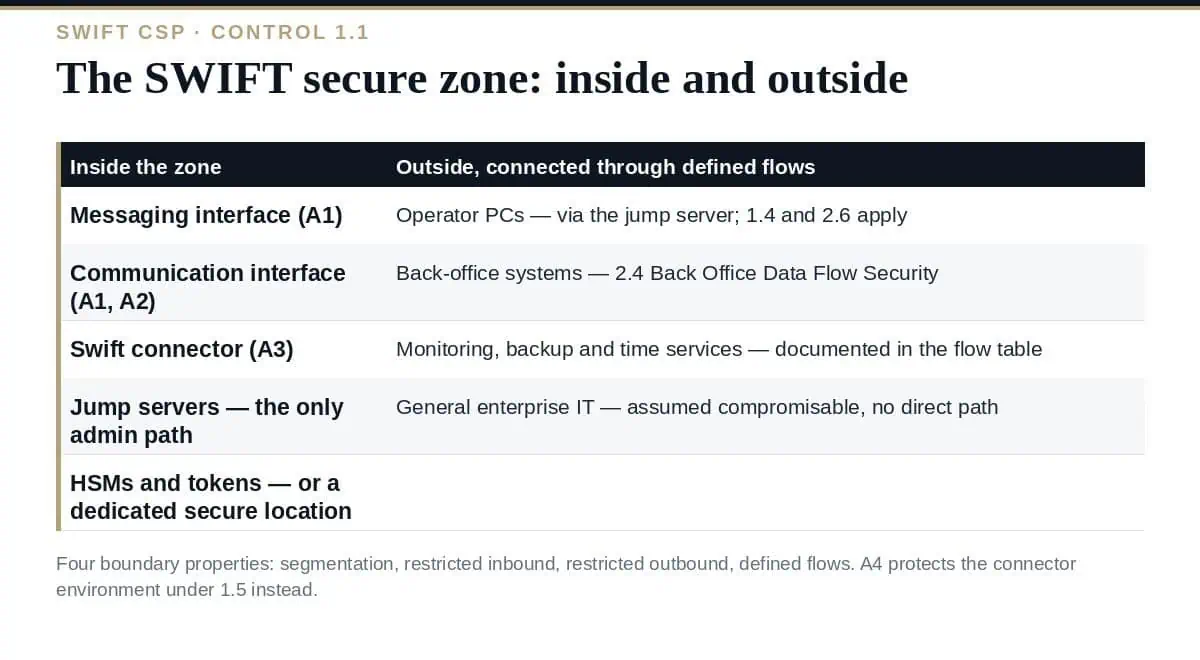
Control 1.1 Swift Environment Protection — the CSCF title, not “Restrict Internet Access”, which is the name of the principle above it — requires the user’s Swift infrastructure to be protected from potentially compromised elements of the general IT environment and the external environment by segregating it into a secure zone. The objective is containment: the general IT environment is assumed to be compromisable, and the zone is designed so that such a compromise does not reach the Swift components. Control 1.1 is mandatory and applies to architecture types A1, A2 and A3; type A4 users, whose Swift footprint is a customer connector, are covered by 1.5 Customer Environment Protection instead, and type B users, with no local Swift footprint, have no zone to build. Our guide to SWIFT architecture types explains the five types.
| Component | Inside the zone? | Architecture types | Note |
|---|---|---|---|
| Messaging interface (e.g. Alliance Access, Alliance Messaging Hub) | Yes | A1 | The core of the local footprint; A2 and A3 users have it hosted elsewhere |
| Communication interface (e.g. Alliance Gateway, SWIFTNet Link) | Yes | A1, A2 | A3 users connect through a connector to a hosted interface |
| Swift connector (e.g. Alliance Lite2 AutoClient, Alliance Cloud connector) | Yes | A3 | The connector is the local Swift footprint for A3 |
| Customer client connector (bespoke or vendor connector to a service bureau or hosted interface) | In scope of fourteen controls from v2026 | A4 | Protected under 1.5 rather than 1.1; the connector’s host is in scope |
| Jump servers used to administer Swift components | Yes | A1–A3 | The only permitted path from operator PCs to the zone components |
| Hardware security modules and tokens (e.g. Luna, Luna Backup device) | Yes, or in a dedicated secure location | A1, A2 | Named in 3.1 Physical Security and 5.4 Password Repository Protection from v2026 |
| Operator PCs | No — outside, connecting through the jump server | All | Subject to 1.4 Restriction of Internet Access and 2.6 Operator Session Confidentiality and Integrity |
| Back-office systems | No — outside, connected through defined flows | All with a back office | Protected by 2.4 Back Office Data Flow Security, mandatory from v2026 |
| General enterprise IT: email, browsing, file shares | No | All | Assumed compromisable; must have no direct path to zone components |
A SWIFT secure zone is defined by what crosses its boundary and how. Four boundary properties are what an assessor tests.
| Boundary property | What it means in practice | CSCF controls that depend on it |
|---|---|---|
| Network segmentation | The zone is a separate network segment — VLANs, dedicated subnets, or physically separate infrastructure — with a firewall or equivalent filtering at the boundary that permits only the documented flows | 1.1; 2.1 Internal Data Flow Security |
| Restricted inbound paths | Administrative access only through jump servers; operator sessions through defined, authenticated, encrypted channels; no direct RDP or SSH from the general environment | 1.2 Privileged Account Control; 2.6 Operator Session Confidentiality and Integrity; 4.2 Multi-Factor Authentication |
| Restricted outbound paths | No general internet access from zone components; updates and Swift connectivity through controlled routes only | 1.4 Restriction of Internet Access; 2.2 Security Updates |
| Defined data flows | Every flow in and out — back office, monitoring, backup, time — documented, protected and monitored | 2.1 Internal Data Flow Security; 2.4 Back Office Data Flow Security; 6.4 Logging and Monitoring |
Two of these SWIFT secure zone boundaries changed in v2026. Control 2.4 became mandatory, so the back-office flows crossing the boundary are now assessed, with bridging servers and the flows between them in scope immediately and legacy direct flows still advisory under Appendix H. And customer client connectors became in-scope components of fourteen controls, which pulls the connector’s host into the protections — hardening, patching, privileged access, logging — that the zone components already carry. Our guide to CSCF v2026 covers both changes.
Each is a non-compliance on 1.1 or its dependent controls, and each is found by comparing the flow table with the actual rule base — which is why the independent assessment starts with the diagram. Our guide to SWIFT mandatory vs advisory controls lists the controls whose status makes those findings matter.
What is the SWIFT secure zone?
The segmented network environment containing a user’s Swift infrastructure — messaging and communication interfaces, connectors, HSMs and the jump servers used to administer them — separated from the general IT environment as required by CSCF control 1.1 Swift Environment Protection.
Which architecture types need one?
A1, A2 and A3, which have a local Swift footprint. A4 users protect their customer connector environment under control 1.5 instead; type B users have no local footprint.
Are operator PCs inside the zone?
No. Operators connect from outside through a jump server inside the zone, and their PCs are constrained by 1.4 Restriction of Internet Access and 2.6 Operator Session Confidentiality and Integrity.
What changed for the secure zone in CSCF v2026?
Back-office flows crossing the boundary are now assessed under the mandatory 2.4, and customer client connectors became in-scope components of fourteen controls, extending the zone’s protections to the connector host.
What does the assessor ask for first?
The architecture diagram with the flow table, then evidence that the firewall or filtering implements exactly those flows. The gap between the two is where most 1.1 findings come from.
Build the SWIFT secure zone from the inventory and the flow table: components inside, operator PCs and general IT outside, a dedicated jump server as the only administrative path, back-office flows protected as external, and a firewall that implements the table and nothing more. Then keep the diagram true, because control 1.1 is assessed by comparing it with reality.
The Secure Zone Architecture Diagram Template, the Network Segmentation and Secure Zone Policy, the Access Control and Operator Session Policy and the patch-management procedure for jump servers and operator PCs are in the SWIFT CSP Compliance Toolkit, or start with the free templates.

September 20, 2026
September 20, 2026
September 19, 2026

September 19, 2026

September 19, 2026

