CART
SWIFT mandatory controls are the 26 controls in CSCF v2026 that every Swift user must implement, attest to and have independently assessed; the six advisory controls are recommended, attested to on a voluntary basis, and expected to become mandatory in a later version. The distinction sounds simple and is the single most common error in attestation workbooks: a control marked advisory that Swift made mandatory is a control omitted from the attestation, and an attestation with a mandatory control missing is non-compliant however good the rest of it is.
This guide sets out which controls are mandatory and which advisory in v2026, how the status is declared in the framework and read from a control’s identifier, how status interacts with architecture applicability, what has moved from advisory to mandatory over recent versions, and how to attest correctly on both kinds.
Free gap assessment
Where do you actually stand against ISO 27001?
Score every management system clause and all 93 Annex A controls, free, and get a prioritised gap list back.
Run the free ISO 27001 gap assessment → or View premium report sample
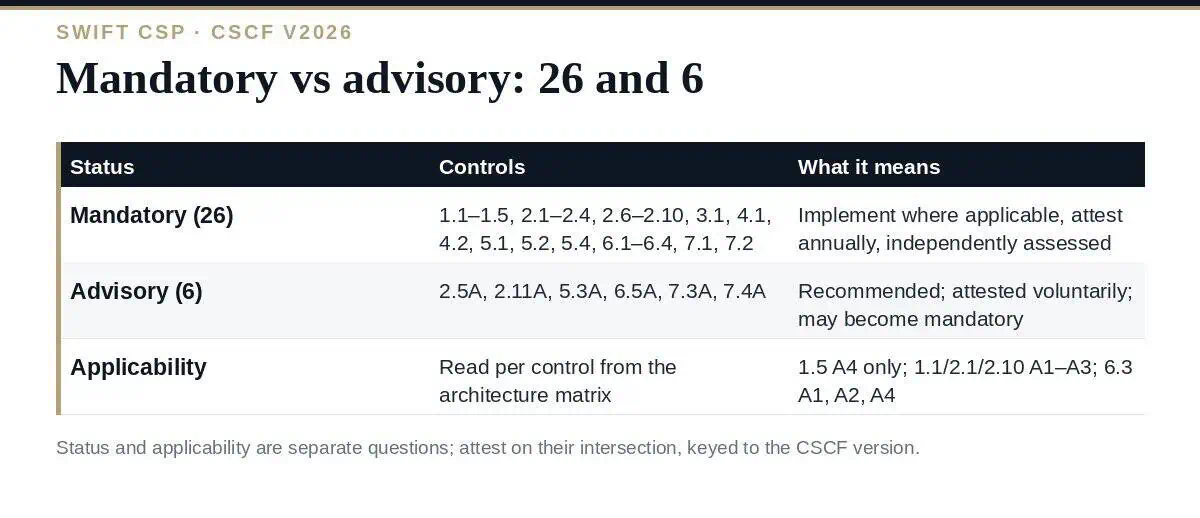
Each control in the CSCF detailed description carries its own “Type:” declaration — Mandatory or Advisory — and the control identifier repeats it: an “A” suffix (2.5A, 5.3A) means advisory. Mandatory controls must be implemented to the extent applicable to the user’s architecture type, attested to annually, and included in the independent assessment. Advisory controls are recommended; users are asked to attest to them too, and the CSCF states that advisory controls may become mandatory in future versions — which is exactly what happened to 2.4 in v2026 and to 1.5 before it. Our guide to CSCF v2026 covers the version’s changes.
| Principle | Mandatory controls |
|---|---|
| Restrict internet access and protect critical systems | 1.1 Swift Environment Protection · 1.2 Operating System Privileged Account Control · 1.3 Virtualisation or Cloud Platform Protection · 1.4 Restriction of Internet Access · 1.5 Customer Environment Protection |
| Reduce attack surface and vulnerabilities | 2.1 Internal Data Flow Security · 2.2 Security Updates · 2.3 System Hardening · 2.4 Back Office Data Flow Security · 2.6 Operator Session Confidentiality and Integrity · 2.7 Vulnerability Scanning · 2.8 Outsourced Critical Activity Protection · 2.9 Transaction Business Controls · 2.10 Application Hardening |
| Physically secure the environment | 3.1 Physical Security |
| Prevent compromise of credentials | 4.1 Password Policy · 4.2 Multi-Factor Authentication |
| Manage identities and segregate privileges | 5.1 Logical Access Control · 5.2 Token Management · 5.4 Password Repository Protection |
| Detect anomalous activity | 6.1 Malware Protection · 6.2 Software Integrity · 6.3 Database Integrity · 6.4 Logging and Monitoring |
| Plan for incident response and information sharing | 7.1 Cyber Incident Response Planning · 7.2 Security Training and Awareness |
| Control | What it asks for | Why it is still advisory |
|---|---|---|
| 2.5A External Transmission Data Protection | Protect the confidentiality of Swift-related data transmitted or stored outside the secure zone, and of data in backups | Depends on external parties and legacy transmission methods |
| 2.11A RMA Business Controls | Restrict and review Relationship Management Application authorizations to counterparties actually needed | Business-relationship judgement; Swift encourages rather than mandates |
| 5.3A Staff Screening Process | Screen staff operating the Swift environment on hiring and periodically | Constrained by local employment law |
| 6.5A Intrusion Detection | Detect and prevent anomalous network activity into and within the secure zone | Tooling maturity varies across the user community |
| 7.3A Penetration Testing | Validate the security configuration by penetration testing | Cost and capability vary; targeted at larger users |
| 7.4A Scenario-based Risk Assessment | Evaluate the risk of business transactions being fraudulent through scenario-based assessment | A newer control, phased in as advisory |
Two independent questions decide whether one of the SWIFT mandatory controls is on your attestation. Status — mandatory or advisory — is fixed per control. Applicability depends on your architecture type, A1 to A4 or B, and is read from the applicability matrix in the CSCF. A mandatory control that does not apply to your architecture is not attested (1.5 Customer Environment Protection is mandatory and applies to A4 only); an advisory control that does apply is attested voluntarily.
The matrix has to be read positionally — the v2026 document shows a dot per architecture column — and the errors that get workbooks wrong are exactly here: controls 1.2, 1.3, 2.3, 2.7, 2.9 and 7.3A apply to all five types including B; 1.1, 2.1 and 2.10 apply to A1–A3 only; 6.3 applies to A1, A2 and A4. Our guide to SWIFT architecture types sets out the types; the practical rule is to build a per-control row with both a status column and an applicability column, and attest on their intersection.
| Control | Advisory until | Mandatory from | What it demanded once mandatory |
|---|---|---|---|
| 2.4 Back Office Data Flow Security | v2025 | v2026 | Protection of flows between the Swift infrastructure and back-office systems; bridging servers and their flows mandatory now, legacy direct flows still advisory under Appendix H, tentatively mandatory 2028 |
| 1.5 Customer Environment Protection | Earlier versions (as 1.5A) | Already mandatory in v2025; applies to A4 | Protection of the customer connector environment |
| 2.8 Outsourced Critical Activity Protection | Earlier versions (as 2.8A) | Mandatory before v2026 | Third parties performing critical Swift activities must meet the same controls |
The pattern by which SWIFT mandatory controls grow is consistent: Swift introduces a control as advisory, publishes the intent to make it mandatory a year ahead in the Overview of Changes, then flips it. A user who implements advisory controls when they are advisory has no transition to make; one who waits attests non-compliant the year they flip. Read the current advisory list as next year’s mandatory list, and read v2027 — published 10 July 2026 — for the ones flagged.
How many SWIFT mandatory controls are there?
Twenty-six in CSCF v2026, out of 32; the other six are advisory. The number changes when Swift moves a control from advisory to mandatory, as with 2.4 in v2026.
How can I tell whether a control is mandatory?
Each control declares its type in the CSCF detailed description, and advisory controls carry an ‘A’ suffix in their identifier — 2.5A, 2.11A, 5.3A, 6.5A, 7.3A, 7.4A. Controls without the suffix are mandatory.
Do I have to attest to advisory controls?
Users attest to advisory controls on a voluntary basis; there is no penalty for non-compliance on them. The independent assessment must cover at least all applicable mandatory controls.
Does mandatory mean it applies to me?
No. Status and applicability are separate. A mandatory control that does not apply to your architecture type — 1.5 for anything other than A4, for example — is not attested. Read the applicability matrix per control.
Which advisory controls will become mandatory next?
Swift announces changes a year ahead in the Overview of Changes of each new version. CSCF v2027, published 10 July 2026, is the document to read for the 2027 flips.
Build the attestation workbook with a status column read from each control’s own type declaration and an applicability column read positionally from the matrix for your architecture, keyed to CSCF v2026 by name. Attest the mandatory applicable controls as compliant or not, disclose what is not, attest the advisory ones honestly, and implement the advisory list as if it were next year’s mandatory one — because in Swift’s programme, it usually is.
The CSCF Control Implementation Summary keyed to v2026 with status and applicability per control, the KYC-SA Self-Attestation Workbook and the Independent Assessment Evidence Pack are in the SWIFT CSP Compliance Toolkit, or start with the free templates.

November 2, 2026
November 1, 2026
October 31, 2026
October 31, 2026
October 30, 2026

