
CART
No products in the cart.
ISO Compliance Insights & Best Practices
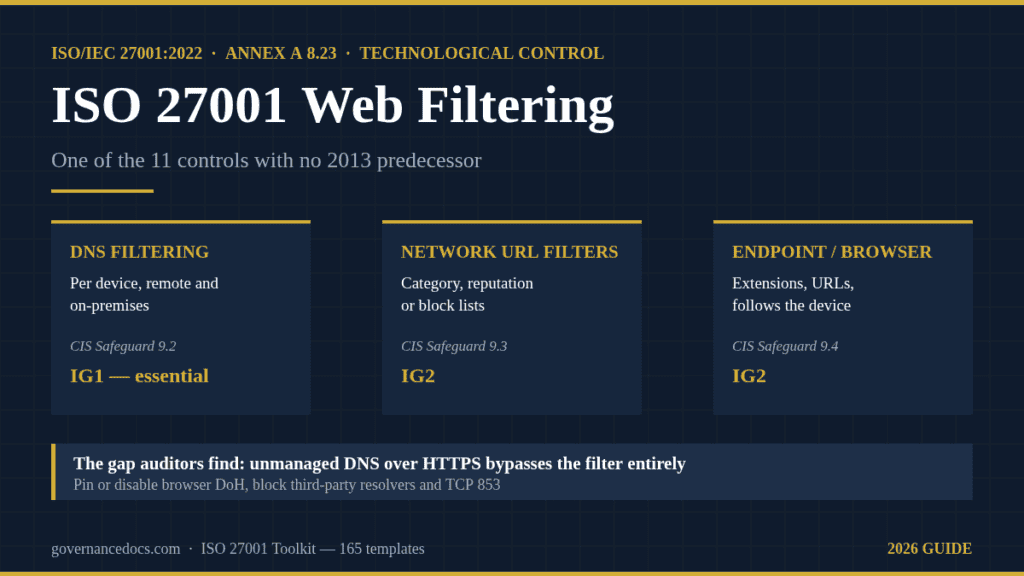
ISO 27001 web filtering is the control most organizations assume they already satisfy because someone bought a firewall subscription years ago, and it is the control that most often produces a shrug when an auditor asks to see the rules. Annex A 8.23 is one of the eleven controls that did not exist in the 2013 edition, which means a transitioned management system usually has a 2013-era document behind almost every other control and nothing at all behind this one.
This guide covers what ISO 27001 web filtering actually asks for under A.8.23, the three implementation patterns and when each is defensible, the encrypted-DNS gap that quietly disables most deployments, and the evidence pack that survives a stage 2 audit. Every figure is sourced to a free primary document you can download and show your auditor.
Free gap assessment
Where do you actually stand against ISO 27001?
Score every management system clause and all 93 Annex A controls, free, and get a prioritised gap list back.
Run the free ISO 27001 gap assessment → or View premium report sample
Annex A 8.23 sits in the technological theme and is written in a single sentence: access to external websites is to be managed so that exposure to malicious content is reduced. ISO/IEC 27002:2022 renders the same sentence with “should” rather than “shall” — that difference is an artifact of 27001 being the requirements standard and 27002 being the guidance standard, not an edition change or a softening of the obligation.
Two words in that one-sentence requirement do the work, and they decide what ISO 27001 web filtering has to look like in your estate. The first is managed, not blocked. A.8.23 does not mandate a blocklist, a proxy or a particular product; it requires that access be governed by a decision you can explain. The second is external. The control is about traffic leaving your estate for the open internet, which is why it applies to the laptop in a coffee shop exactly as much as to the desktop on the office LAN.
The guidance standard goes considerably further than “buy a filter.” Paraphrasing its implementation guidance, it expects the organization to identify the categories of site that should be unreachable, and it names several: sites that are known or suspected to carry malicious content, command-and-control infrastructure, sites identified as malicious through threat intelligence, sites distributing illegal material, sites carrying content inappropriate for the workplace, and — the one almost every vendor explainer omits — sites that allow information to be uploaded, which should be reachable only where there is a business reason for it.
That last category is why ISO 27001 web filtering is not purely a malware control. A rule that blocks paste sites, personal file-sharing and unapproved webmail is an exfiltration control wearing a web-filtering badge, and it is the point where A.8.23 meets A.8.12 data leakage prevention. Treat the two as one design conversation and the egress rules write themselves.
27002’s guidance also names the techniques it has in mind — heuristics, signatures, lists of prohibited and permitted sites, and configuration at the domain level — and it asks for two things that are not technical at all: that users be trained in the safe and appropriate use of online resources, and that there be a route for legitimate business access to an otherwise restricted site. A deployment with perfect rules and no exception process is an incomplete implementation of the control.
ISO/IEC 27001:2022 is edition 3, published October 2022, with one amendment (the free climate-action Amendment 1:2024). Its Annex A carries 93 controls in four themes: 37 organizational, 8 people, 14 physical and 34 technological. Eleven of those 93 are genuinely new, with no 2013 predecessor to map from:
| Control | Title | Theme |
|---|---|---|
| A.5.7 | Threat intelligence | Organizational |
| A.5.23 | Information security for use of cloud services | Organizational |
| A.5.30 | ICT readiness for business continuity | Organizational |
| A.7.4 | Physical security monitoring | Physical |
| A.8.9 | Configuration management | Technological |
| A.8.10 | Information deletion | Technological |
| A.8.11 | Data masking | Technological |
| A.8.12 | Data leakage prevention | Technological |
| A.8.16 | Monitoring activities | Technological |
| A.8.23 | Web filtering | Technological |
| A.8.28 | Secure coding | Technological |
The practical consequence is specific. When an organization moved from the 2013 edition, it rebuilt its Statement of Applicability against the new Annex A and, for most controls, pointed each new reference at a document that already existed. A.8.23 had nothing to point at. So the line in the SoA says “applicable,” the justification says something about the firewall, and the evidence folder is empty. Auditors have learned to open that folder first, in the same way they learned to ask about A.8.16 for monitoring activities and A.7.4 for physical security monitoring.
Note also what A.8.23’s novelty does not mean. Nobody was failing to filter the web in 2013 — the activity is older than the control. What is new is that the activity now has its own Annex A line, its own SoA justification and its own evidence requirement, separate from A.8.7 malware protection and A.8.20 networks security.
There are three ways to enforce ISO 27001 web filtering, and the certification question is not which is best but which you can justify for your risk profile and your estate. The comparison below is the one worth having before you spend anything.
| Pattern | Where enforced | Sees | Covers remote devices | Typical cost signal | Main weakness |
|---|---|---|---|---|---|
| DNS filtering service | Name resolution, per device or per network | Domain names only | Yes, if configured on the device rather than the router | Low; often per-seat and in reach of a 20-person company | Blocks a whole domain or nothing; bypassed by encrypted DNS and by direct IP access |
| Secure web gateway or proxy | Network egress, or cloud point of presence | Full URLs, categories, file types; page content if TLS is inspected | Only with an agent or tunnel | Medium to high; usually per-seat with a platform fee | Cost, latency, and the certificate-handling questions that come with inspection |
| Endpoint or browser-based filtering | On the device itself | URLs and browser behavior, including extensions | Yes, by design | Often bundled with an existing endpoint or management suite | Coverage gaps on unmanaged, personal and operational-technology devices |
Most defensible ISO 27001 web filtering builds are not a single row of that table. They are DNS filtering everywhere as the floor, a gateway or endpoint layer where the risk assessment calls for category and URL granularity, and a written statement of which assets are covered by which layer. That statement — not the product name — is what closes the finding.
Free ISO 27001 risk assessment
Which of your risks sit above your appetite line?
Set your own risk criteria, pick from 61 information security risk scenarios, rate likelihood and impact, and decide how to treat each one. You get a heat map, a process score and the findings an auditor would raise, free.
Run the free risk assessment → or View premium report sample
ISO 27001 sets no technical specification for web filtering, which is exactly why a free, tiered external benchmark is so useful when you have to defend a modest implementation. CIS Controls v8.1 (June 2024) puts email and web browser protections in Control 9, which has seven safeguards graded across three Implementation Groups:
| Safeguard | Requirement | Asset type | Lowest IG |
|---|---|---|---|
| 9.1 | Use only fully supported browsers and email clients, on the latest vendor version | Software | IG1 |
| 9.2 | Use DNS filtering services on all end-user devices, remote and on-premises, to block known malicious domains | Devices | IG1 |
| 9.3 | Maintain and enforce network-based URL filters — category, reputation or block lists — for all enterprise assets | Network | IG2 |
| 9.4 | Restrict unnecessary or unauthorized browser and email client extensions | Software | IG2 |
| 9.5 | Implement DMARC, starting with SPF and DKIM | Network | IG2 |
| 9.6 | Block unnecessary file types at the email gateway | Network | IG2 |
| 9.7 | Deploy and maintain email server anti-malware protections, such as attachment scanning or sandboxing | Network | IG3 |
Two of the seven safeguards sit in IG1, the tier CIS defines as essential cyber hygiene for every enterprise regardless of size. Read the asset types alongside the tiers and the design guidance is unusually blunt: DNS filtering is an IG1 obligation and CIS attaches it to the device, while network-based URL filtering only appears at IG2 and is attached to the network.
That single distinction answers the most common ISO 27001 web filtering budget question. A 25-person company that puts a DNS filtering service on every laptop — including the ones that never touch the office network — is implementing the control at the tier a recognized benchmark says applies to it. A company that buys a gateway for the head office and leaves the field team unfiltered has bought the IG2 answer and failed the IG1 one. Our CIS Controls to ISO 27001 mapping walks the rest of the crosswalk.
Here is the failure mode that quietly disables ISO 27001 web filtering and that almost no explainer mentions, and that an experienced auditor will find in ten minutes. If filtering is enforced at DNS, it works only while the device asks your resolver. Modern browsers and operating systems can resolve names over DNS over HTTPS (DoH) or DNS over TLS (DoT) to a public resolver of their own choosing, and when they do, the query never reaches your filter. The block list is intact, the dashboard is green, and the control is not operating.
NSA addressed this directly in its information sheet Adopting Encrypted DNS in Enterprise Environments (January 2021). Its recommendation is to designate an enterprise DNS resolver, allow DoH clients to query only that resolver, and disable and block all other encrypted DNS resolvers — including by blocking known public DoH resolver addresses at the gateway and blocking TCP port 853, the registered port for DNS over TLS. Where the enterprise resolver provides protections but cannot speak DoH, NSA’s position is that the tradeoff favors the protections: use the enterprise resolver and disable encrypted DNS inside the network until the capability can be integrated.
NSA is careful about what encryption buys. DoH encrypts the transaction between client and resolver; it does not make the subsequent connection invisible, and it does not by itself protect against a threat actor. Encrypted DNS is not the enemy of ISO 27001 web filtering — unmanaged encrypted DNS is.
The companion document is the NSA and CISA joint information sheet Selecting a Protective DNS Service, released 4 March 2021, whose framing is worth borrowing for your risk treatment: protective DNS reduces the effectiveness of ransomware, phishing, botnet and malware campaigns by blocking known-malicious domains, and the query logs themselves support incident response and threat hunting. That second clause matters for your evidence pack, because it ties A.8.23 to A.8.15 logging and A.8.16 monitoring activities — the DNS query log is both a filtering record and a detection source.
Three configuration items follow, and they belong in your implementation record:
Category and URL filtering on encrypted traffic usually means terminating TLS at the gateway, re-encrypting onward, and installing an enterprise certificate authority on every managed device. It works, it is common, and it has consequences that belong in the risk assessment rather than in a footnote.
The clearest free statement of that comes from the NIST catalog itself. NIST SP 800-53 Rev. 5 control SC-7(8) requires organization-defined internal traffic to be routed to external networks through authenticated proxy servers at managed interfaces. Its discussion observes that web content filtering devices are among the most common proxy servers providing internet access, that proxies can log TCP sessions and block specific URLs, IP addresses and domain names — and then adds the caveat: proxy servers may inhibit the use of VPNs and, depending on implementation, create the potential for man-in-the-middle attacks.
That is the control catalog of the US federal government noting that the standard implementation of web filtering can itself introduce a risk. ISO/IEC 27002’s guidance for A.8.24 makes the mirror-image point from the cryptography side: encryption affects controls that rely on inspecting content, malware detection and data leakage prevention among them. Put the two together and the decision is explicit rather than accidental:
Whichever way you go, the reasoning goes in the risk treatment plan and the certificate handling goes in your cryptography policy. An auditor who finds an enterprise root CA pushed to every laptop with no corresponding entry in either document has found a real nonconformity, not a technicality.
ISO 27001:2022 states no review interval for web filtering, and no auditor can hold you to one it does not contain. Not in Annex A, not in clause 9. ISO/IEC 27002 asks for rules to be reviewed and kept current without putting a number on it. Several well-known vendor checklists assert quarterly category reviews, monthly log sampling or annual policy reviews as if they were requirements of the standard; they are not, and quoting them back to an auditor as ISO requirements invites a question you cannot answer.
What the standard does require, through clause 6 and clause 9, is that your own stated interval be met. So pick the interval, write it down, anchor it to something external, and then actually hit it. CIS Control 4.1’s “annually or on significant change” cadence for the configuration process is a reasonable external anchor; so is a quarterly exception review tied to the expiry dates you set on exceptions. A missed interval that you set yourself is a finding. No interval at all is a different finding. An interval you invented and attributed to ISO is both, plus a credibility problem.
ISO 27001 web filtering is a technological control, so the evidence is overwhelmingly configuration and records rather than prose. This is the pack that holds up:
| Evidence | What it proves | Where it usually fails |
|---|---|---|
| Statement of the blocked and permitted categories, with the reason for each | Access is managed by decision, not by vendor default | The list is the vendor’s default template with nothing chosen |
| Current configuration export or screenshots, dated, from each enforcement point | The rules are live, not aspirational | Screenshots predate the last platform migration |
| Asset coverage statement mapping every device class to an enforcement layer | Remote, BYOD and OT devices are in scope or consciously excluded | Laptops off-network, contractors and mobile are silently uncovered |
| Blocked-request logs, with retention stated | The control operates and produces detection value | Logging is on but nobody has ever looked, so A.8.16 fails too |
| Exception register: requester, business justification, approver, expiry | There is a legitimate route around a block | Exceptions exist as email threads, with no expiry |
| Encrypted DNS posture: enterprise resolver named, third-party DoH and DoT blocked | The filter cannot be bypassed from the endpoint | Never considered; browsers resolve to a public resolver |
| Awareness material covering safe web use and how to report a block or a suspicious site | The 27002 training limb of A.8.23 is satisfied | Training covers phishing only and never mentions web rules |
| Review records at your own stated interval | Clause 9 conformity on your own cadence | Interval stated in the policy, never evidenced |
Build that pack once and ISO 27001 web filtering stops being an audit risk. Seven of the eight rows are produced by the tooling you already own; the one that takes real work is the asset coverage statement, because it forces you to admit which devices nobody is filtering.
No. A.8.23 asks for no documented information by name, so there is no mandatory ISO 27001 web filtering policy, and a web filtering policy does not appear among the documents ISO 27001:2022 requires — see our breakdown of the mandatory documents and records. Vendor audit checklists that call a documented acceptable use or web filtering policy “explicitly required” are describing good practice, not a clause.
That is not an argument for having nothing. Excluding A.8.23 from the Statement of Applicability is implausible for any organization whose staff use a browser, and the moment you declare it applicable you owe an auditor a rule set, a coverage statement and an exception route. Most organizations find it easier to carry those as a short section inside the acceptable use policy and the network security standard than as a standalone document nobody owns. Either structure passes. The absence of both does not.
| Days | Action | Output |
|---|---|---|
| 1–3 | Inventory every device class that reaches the internet, including contractor, mobile and OT assets | Asset coverage draft with the gaps named |
| 4–7 | Decide the blocked categories: policy-driven, threat-intelligence-driven, and upload-capable sites | Category decision record with a reason per category |
| 8–14 | Deploy or re-point DNS filtering to every end-user device, not only the office network | Enforcement live on the IG1 floor; configuration export |
| 15–18 | Close the encrypted DNS gap: pin or disable browser DoH, block third-party resolvers and TCP 853 | Browser and gateway policy, with the test that proves bypass fails |
| 19–22 | Decide the TLS inspection question and record the reasoning and any exempt categories | Risk treatment entry; cryptography policy updated |
| 23–26 | Stand up the exception register with named approvers and mandatory expiry dates | Register, plus the request form people will actually use |
| 27–30 | Add web rules to awareness material; set and diary the review interval | Training record and a review cadence you can evidence |
Thirty days is realistic for ISO 27001 web filtering because the hard parts are decisions rather than engineering. Organizations that run over usually stall at day 15, because closing the encrypted DNS gap means touching browser policy on every managed device.
If you report against both frameworks, or you want an external completeness test for your own ISO 27001 web filtering design, the Rev. 5 catalog supplies the limbs A.8.23 leaves implicit:
| NIST control | What it adds to A.8.23 |
|---|---|
| SC-7(8) Route traffic to authenticated proxy servers | The proxy pattern itself, plus the explicit man-in-the-middle and VPN caveat |
| SC-18 Mobile code | Define acceptable and unacceptable mobile code, then authorize, monitor and control its use — the browser-side half of the problem |
| SI-3 Malicious code protection | The malware-detection layer A.8.23 is meant to reduce load on, matching A.8.7 |
| AC-4 Information flow enforcement | Egress as a flow-control decision, which is where the upload-capable category belongs |
| AU-2 and AU-6 Event logging and review | That blocked-request logs are generated and read, matching A.8.15 and A.8.16 |
Rev. 5’s current minor release is 5.2.0, issued 27 August 2025. When an ISO 27001 web filtering design cites these controls, use the identifiers rather than page numbers if you reference them in your own documents, because the pagination moves between updates.
No. ISO 27001 names no product or technique for A.8.23 — it requires that access to external websites be managed to reduce exposure to malicious content. A DNS filtering service on every device, with a documented category decision and an exception process, is a complete implementation for many organizations. CIS Controls v8.1 supports that reading by placing DNS filtering at IG1 and network-based URL filtering at IG2.
You can exclude any Annex A control if the justification stands up, but this one rarely does. If staff browse the web from assets in your ISMS scope, the exposure the control addresses exists, and clause 6.1.3 requires you to compare your controls against Annex A and justify exclusions. An exclusion based on “we have antivirus” conflates A.8.23 with A.8.7 and will be challenged.
ISO 27001 web filtering applies identically, which is the point most implementations miss. A.8.23 is about access to external websites, not about the office perimeter, so enforcement has to follow the device. That means device-level DNS filtering or an endpoint agent rather than a router setting, and it means your remote working rules and your filtering rules must describe the same reality. Unmanaged personal devices are usually handled by denying them access to organizational data rather than by filtering them.
No. Productivity blocking is a management choice, not a security requirement, and no auditor will raise a nonconformity because marketing can reach a social network. What they will test is whether the categories you chose match the policy you wrote and the risks you assessed. A policy that forbids social media while the filter permits it is a finding; a filter that permits it because you decided to is not.
The standard sets no interval. Choose one, justify it, and meet it. A common defensible pattern is a quarterly review of exceptions, driven by the expiry dates you attach to them, plus an annual review of the category set and the policy — the second anchored to the “annually or on significant change” cadence CIS uses for configuration processes. Evidence of the reviews matters more than the number you picked.
It is enough to be the floor, and for a small, low-complexity estate it can be the whole answer. It is not enough if your risk assessment calls for URL-level or file-type control, and it is not enough anywhere if the endpoints can reach a public DoH resolver — in that case it is not filtering at all. Close the encrypted DNS gap before you spend money on a second layer.
ISO 27001 web filtering is one of the cheapest Annex A controls to implement properly and one of the most commonly half-finished, because the technology arrives before the decisions do. Start with the category decision record and the asset coverage statement; the tooling question answers itself once you know which devices you are protecting and what you are protecting them from.
If you would rather not draft the policy section, the exception register and the SoA justification from scratch, the ISO 27001 Toolkit is 165 editable templates covering the full Annex A control set alongside the clause 4–10 management system documents, at $149 with no subscription. It includes the acceptable use and network security documents where most organizations choose to carry their web filtering rules, plus the Statement of Applicability and risk treatment plan those rules have to agree with. For the wider control set, start with our guide to the 93 ISO 27001:2022 Annex A controls.

October 15, 2026
October 15, 2026
October 14, 2026
October 14, 2026
October 14, 2026
