

Incident Response Automation: The Practical 2026 Guide
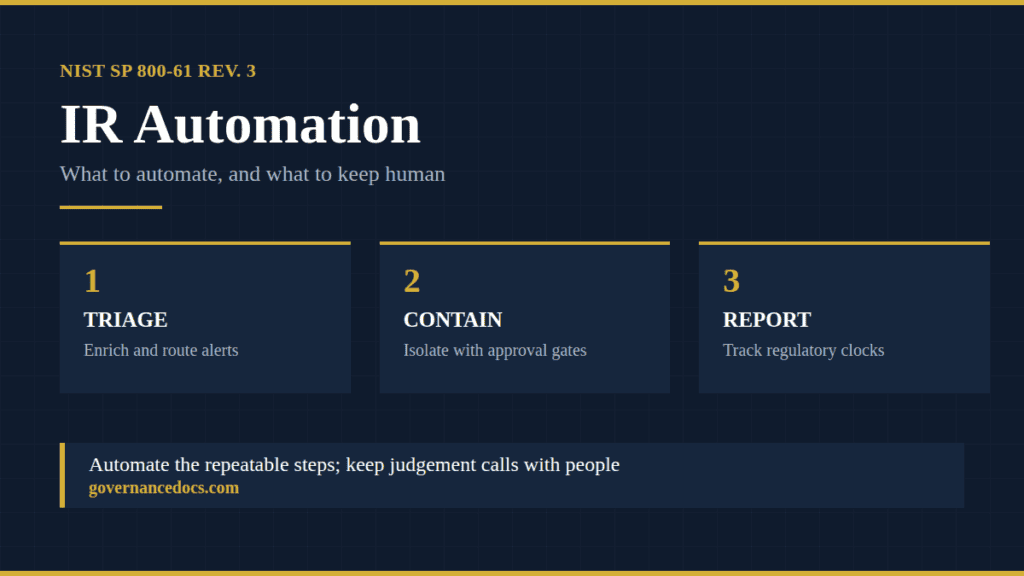
Incident response automation is the use of tools and scripted playbooks to run the repeatable steps of incident handling, such as enriching alerts, opening cases and isolating a device, without waiting for an analyst. Done well, it gives your team back the hours they spend copying data between consoles, so they can spend them on judgment.
Done badly, it locks out your CEO at 2 a.m. or wipes the evidence you needed. This guide covers what incident response automation should handle and what to keep human, how SOAR, SIEM and XDR differ, four playbook examples, the guardrails auditors expect, and a playbook skeleton you can copy.
Free gap assessment
What does your CSF 2.0 Current Profile look like?
Score all 106 subcategories across the six functions, free, including the 31 under Govern that version 1.1 never asked about.
Run the free NIST CSF gap assessment → or View premium report sample
What incident response automation is, and what it is not
Automation executes decisions you made in advance. It is good at speed, consistency and record-keeping. It is poor at context, proportion and anything with legal or business consequences.
So the design question is never “can we automate this?” It is “would we be comfortable if this ran every time the trigger fired, including the times it is wrong?” If the answer is no, automate the preparation and leave the decision to a person.
A useful split is three tiers: fully automated (enrichment, ticketing, notifications to the team), automated with approval (containment that affects users or services), and human only (declaring an incident, regulatory reporting, ransom and law-enforcement decisions).
SOAR vs SIEM vs XDR: which security incident response platform does what
Buyers often treat these as competing products. They do different jobs and many teams run more than one. The descriptions below are generic; individual products overlap.
| Capability | SIEM | SOAR | XDR |
|---|---|---|---|
| Main job | Collect, store and correlate logs; raise alerts | Orchestrate tools and run playbooks across them | Detect and respond across the vendor’s own sensors |
| Data sources | Broad: anything that can send logs | Whatever it integrates with through connectors | Mostly the vendor’s endpoint, email, identity, network or cloud telemetry |
| Response actions | Limited, usually alerting | Wide: any action a connected tool exposes | Built-in actions on its own sensors, such as isolating a host |
| Case management | Basic in many products | Core feature, with audit trail | Varies |
| Best fit | Visibility, retention, compliance logging | Cross-tool workflow and consistent handling | Fast detection and containment on covered assets |
In short: SIEM tells you something happened, XDR acts fast where it has sensors, and SOAR coordinates everything else. A SOAR platform is the classic security incident response platform for automation, but many SIEM and XDR products now include playbook features too.
Where automation fits in NIST SP 800-61 Rev. 3
NIST published SP 800-61 Revision 3 in April 2025. It supersedes the 2012 Revision 2 and is written as a Community Profile of the NIST Cybersecurity Framework 2.0, so the old four-phase lifecycle is replaced by the six CSF functions.
Our summary of what changed in NIST 800-61 Rev 3 explains the new model. For automation, the useful view is by CSF function.
- Govern, Identify, Protect: automation keeps asset inventories, contact lists and playbooks current. Low risk, often skipped.
- Detect (DE.CM, DE.AE): continuous monitoring and adverse event analysis. This is where enrichment, deduplication and triage scoring pay off most.
- Respond (RS.MA, RS.AN, RS.CO, RS.MI): case creation, evidence capture and containment actions with approval gates.
- Recover (RC.RP, RC.CO): restoration checks and status updates. Restoration decisions stay human.
Incident response automation decision table
Use this table as a starting point. Adjust it to your risk appetite and record the decision in your incident response plan.
| Task | Automate? | Why |
|---|---|---|
| Alert enrichment (IP, domain, hash reputation, asset owner, user details) | Yes, fully | Read-only, repetitive and fast to verify |
| Deduplication and alert grouping | Yes, fully | Reduces noise without changing systems |
| Opening a case and assigning an owner | Yes, fully | Creates the audit trail from minute one |
| Phishing email triage and removal of confirmed copies from mailboxes | Yes, with rules | High volume, clear criteria; keep a human check for VIP mailboxes |
| Blocking a known-bad domain or hash | Yes, with expiry | Easy to reverse; add an automatic review date |
| Isolating an endpoint | With approval | Affects a user or service; reversible but disruptive |
| Disabling an account or revoking sessions | With approval for privileged and executive accounts | A false positive can halt a business process |
| Declaring an incident and setting severity | Human | Requires judgment about business impact |
| Collecting forensic images | Prepare automatically, start on approval | Chain of custody and storage costs need a decision |
| Regulatory and customer notification | Human, with automated deadline tracking | Legal judgment; automation tracks the clock |
| Restoring systems to production | Human | Must confirm the threat is eradicated first |
Four automated incident response playbook examples
These are the patterns most teams automate first. Each assumes a human is notified and can stop the run.
1. Phishing triage
Trigger: a user reports a suspicious email. Automation extracts URLs, attachments and headers, checks reputation, and searches for the same message in other mailboxes.
If indicators are confirmed malicious, it removes matching copies, blocks the sender and opens a case. If anyone clicked, it escalates to an analyst for account review.
2. Account lockout after credential attack
Trigger: signs of password spraying or an impossible-travel sign-in. Automation enriches the sign-in with location, device and recent activity, then revokes active sessions and forces a password reset for standard accounts.
For privileged, service and executive accounts, it prepares the same actions but waits for approval. Locking a service account can take production down.
3. Endpoint isolation
Trigger: a high-confidence malware or ransomware detection. Automation captures volatile data where the tool supports it, tags the host and requests isolation.
Approval can be pre-granted for workstations and required for servers. The playbook should record who approved, when, and how to release isolation.
4. Enrichment for every alert
This is the safest and often the most valuable automation. Every alert arrives with asset owner, criticality, recent changes, related alerts and threat intelligence context already attached.
Analysts stop spending the first fifteen minutes gathering facts. Nothing changes in production, so the risk is close to zero.
Guardrails for automated incident response
Auditors and regulators will ask how you prevent automation from causing an incident of its own. These guardrails answer that question.
- Approval gates. Define which actions need a human, by asset class and account type, and who may approve.
- Rollback. Every containment action needs a tested reverse action and an expiry or review date.
- Logging. Record every trigger, input, decision, action and approver in the case. This becomes your incident timeline.
- Rate limits and kill switch. Cap how many accounts or hosts a playbook can act on per run, and give the on-call lead a way to stop it.
- Change control. Treat playbooks as code: version them, review changes and test before release.
- Exercise testing. Walk automated playbooks through tabletop exercise scenarios so people know what the tooling will do and where they step in.
Playbook template skeleton
Use this structure for each incident response automation playbook. It fits inside a standard incident response playbook and keeps the human steps visible.
- Name, ID, version, owner, last tested date.
- Scope: incident types and asset classes covered; what is out of scope.
- Trigger: the alert or condition that starts the run, with confidence threshold.
- Enrichment steps: data gathered automatically and where it is stored.
- Decision points: each branch, its criteria, and whether it is automated or human.
- Actions: each action, the approval it needs, the approver role, and its rollback.
- Limits: maximum actions per run, timeouts, kill-switch owner.
- Evidence: what is preserved, where, and how chain of custody is kept.
- Escalation and notification: who is told, when, and which regulatory clocks may start.
- Closure: exit criteria, case closure fields, lessons-learned trigger.
- Test record: date, method (simulation or tabletop), result and fixes.
Pair each playbook with an incident response checklist for the manual steps, so analysts have one view when the automation stops.
Regulatory clocks that automation helps you meet
Automation cannot decide whether an incident is material or significant. It can record the moment each clock starts, calculate deadlines and alert the right people. Note that the clocks start from different events.
| Regime | Who it applies to | Clock |
|---|---|---|
| SEC Form 8-K Item 1.05 | US SEC registrants | Within four business days after determining the incident is material; the materiality determination must be made without unreasonable delay after discovery |
| NIS2 Directive, Article 23 | Essential and important entities in the EU | Early warning within 24 hours of becoming aware of a significant incident; incident notification within 72 hours; final report within one month of the incident notification |
| DORA, with Delegated Regulation (EU) 2025/301 | EU financial entities | Initial notification within 4 hours of classifying an incident as major and no later than 24 hours from becoming aware; intermediate report within 72 hours of the initial notification; final report within one month of the latest intermediate report |
Our NIS2 incident reporting guide covers the three NIS2 deadlines in detail. National transposition rules and sector rules can add to these, so have counsel confirm which apply.
Measuring incident response automation: MTTD and MTTR
Two measures show whether automation is working. Define them once, in writing, and keep the definition fixed so trends mean something.
- MTTD, mean time to detect: the average time from the first evidence of malicious activity to detection by your team or tools.
- MTTR, mean time to respond: the average time from detection to containment. Some teams use “recover” or “resolve” instead, so state which end point you measure.
Baseline both before you add incident response automation, then compare by incident type. Also track false-positive actions and rollbacks, because faster is not better if the playbook keeps acting on the wrong targets.
Choosing a security incident response platform: evaluation criteria
A security incident response platform is the tool that runs your playbooks, holds your cases and records what happened. Whether you buy a SOAR product or use the playbook features in a SIEM or XDR, judge it on the criteria below.
| Criterion | What to check |
|---|---|
| Playbook automation | Visual or code playbooks, version control, a test or dry-run mode, and rollback of automated actions |
| Integrations | Maintained connectors for your SIEM, EDR or XDR, email, identity and ticketing tools, plus an API for the rest |
| Case management | Cases, tasks, owners and timelines, with severity levels that match your own matrix |
| Evidence handling and chain of custody | Hashing of collected artifacts, a record of who accessed each item, and export in a form legal teams can use |
| Approval gates | Human approval before disruptive actions, with named approvers by role |
| Audit logging | A tamper-resistant log of every automated and manual action, retained for as long as your policy requires |
| Metrics | MTTD, MTTR, automation rate and false-positive actions, calculated the way you defined them above |
| Regulatory clock tracking | Timers that start from the right event for each regime in the table above: awareness, classification or materiality determination |
| Deployment model | SaaS, on-premises or hybrid, data residency, and how the platform’s own privileged credentials are protected |
Test two or three of your own playbooks in a proof of concept rather than relying on the vendor’s demo. Include one that needs an approval gate and one that collects evidence.
Tooling does not replace the plan
A platform runs the playbooks you write. It does not decide severity, who may declare an incident, or when to notify a regulator. Settle those in your incident response plan, using the roles and outcomes in NIST SP 800-61 Rev. 3, before you configure the first workflow.
Incident response automation FAQ
What should we automate first?
Start with enrichment, deduplication and case creation. They are read-only, low risk and save analyst time on every alert. Move to containment only after those run reliably.
Do we need a SOAR platform for incident response automation?
Not always. Many SIEM and XDR products include playbook features that cover common cases. A dedicated SOAR platform helps when you need workflows across many tools from different vendors.
Can automation file regulatory notifications for us?
It can track deadlines and draft content from case data. The decisions to notify, and the content of the notice, should stay with people who have legal authority, because materiality and significance are judgment calls.
How often should automated playbooks be tested?
Test after every change and at least on a fixed schedule set in your plan. Tabletop exercises test the human decisions; simulations test the technical steps. You need both.
Our Incident Response Toolkit provides 93 editable templates aligned to NIST SP 800-61 Rev. 3 — including an Incident Response Plan, 13 scenario playbooks with a blank playbook framework, and an Incident Legal Regulatory and Contractual Obligations Register — for $99.
When a standard changes, know first
One email a month: edition changes, new deadlines, and what they mean for documentation you already have. No sales sequence.

Governance Docs
Governance Docs LLC
Recent Posts

November 27, 2026

November 27, 2026

November 26, 2026
November 26, 2026

November 26, 2026