

An enterprise risk assessment looks at the risks to what the organization is trying to achieve: its strategy, its finances, its operations, its obligations and its reputation. ISO 31000 describes the process: set your risk criteria, including how much risk you are prepared to take, identify, analyse and evaluate the risks against them, and decide how to treat the ones you will not accept.
This tool takes you through it in that order. List your objectives, business units, core processes, major projects, key suppliers and key assets, pick risks from a library of 36 strategic, financial, operational, legal and reputational scenarios, rate them and decide what to do about each one. It is free, and your answers save as you go.
Premium report
See what the premium enterprise risk assessment report looks like
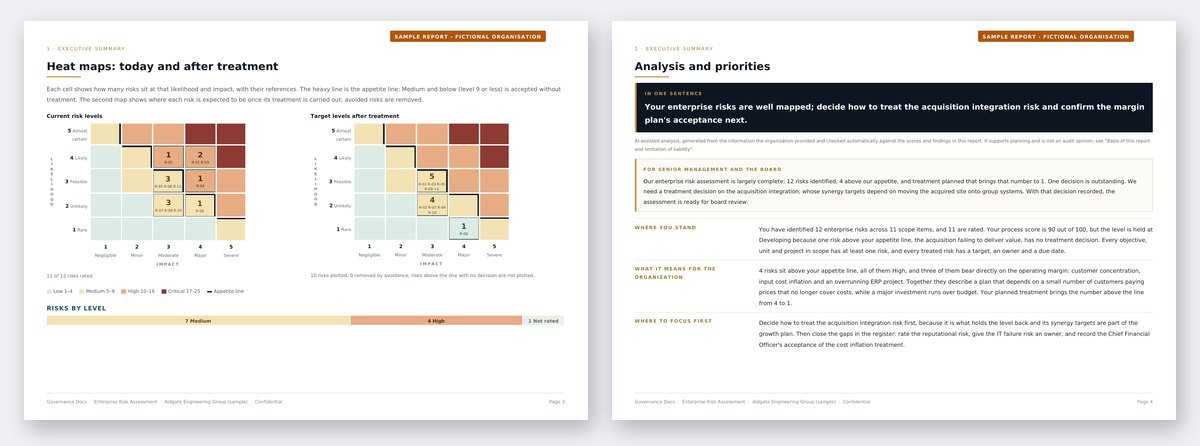
A worked sample for a fictional organization: the ranked enterprise risk register, heat maps before and after treatment, the treatment plan with its controls, every finding with the document that closes it, an AI-assisted analysis with a 30/60/90-day roadmap, plus the live Excel workbook.
Other free risk assessments: Information Security Risk Assessment (ISO 27001) Privacy Risk Assessment (ISO 27701) Business Continuity Risk Assessment (ISO 22301) AI Risk Assessment (ISO 42001) Data Protection Impact Assessment (GDPR) Transfer Impact Assessment (GDPR) AI System Impact Assessment (ISO 42005) Legitimate Interests Assessment (GDPR) Third-Party Risk Assessment (ISO 27001)
What this tool covers
- Scope and criteria. Your likelihood and impact scales and your risk appetite, which ISO 31000 clause 6.3.4 asks you to define before anything is rated.
- What is in scope. The objectives, units, processes, projects, suppliers and assets the risks could affect.
- Risks. Scenarios from the library, from customer concentration and cost inflation to project overruns, regulatory breaches, loss of key people and reputational damage, or your own. Each is tagged by category: strategic, financial, operational, legal and compliance, reputational, and health and safety.
- Analysis. Likelihood and impact for each risk, with the controls already in place and the reason for the rating.
- Treatment. Modify, avoid, share or retain, the kinds of control the treatment relies on, an owner, a date, a target level and the risk owner’s acceptance.
What you get, free
Your heat map against your own appetite, the highest risks in priority order, a process score out of 100 that shows how complete and defensible the assessment is, and the findings a reviewer would raise. Sign in and it stays in your account, ready for next year’s review.
The full report adds the complete register, heat maps before and after treatment, the treatment plan by owner and due date, and an AI-assisted analysis with a board statement and a 30/60/90-day roadmap, with the register as a live Excel workbook.
Where this fits
The register this produces is the core of a risk management framework: it gives a board its risk profile, a risk committee its agenda and internal audit its plan. Our guide to risk appetite covers how to set the line; for how the frameworks compare, see ISO 31000 vs COSO ERM and ISO 31000 vs ISO 27005. To check your risk management framework against the standard, run the ISO 31000 gap assessment.
For the columns every register needs and a worked example, read our guide to the enterprise risk register.
Frequently asked questions
What is the difference between an enterprise and an operational risk assessment?
Scope. An enterprise risk assessment covers every kind of risk to the organization’s objectives, from strategy and finance to compliance and reputation, and is usually owned by the executive team and reported to the board. An operational or information security assessment covers one area in more depth.
Does it follow COSO as well as ISO 31000?
It is built to ISO 31000:2018, but the steps, criteria, appetite and register are the same building blocks COSO ERM uses, so the result fits either framework.
How many risks should a register have?
Enough to cover the objectives in scope, usually between 15 and 40 at enterprise level. Group near-duplicates and keep the detail for the operational registers underneath.
What happens to the information I enter?
It is stored with your assessment so you can come back to it, and it is never shared. You can delete an assessment permanently from your account at any time.
Is this a substitute for an independent assessment?
No. It is a self-assessment built from the information you enter, and Governance Docs does not review or verify it.