

An information security risk assessment is the step every ISO 27001 control decision is supposed to follow from, and the one auditors test hardest. It has to use criteria you set in advance, name an owner for every risk, show how each level was reached, and end with a treatment decision for everything you are not prepared to accept.
This tool takes you through it in that order. Pick risks from a library of 61 common scenarios, each mapped to the Annex A controls that usually treat it, rate them against your own scales, and decide what to do about each one. It is free, your answers save as you go, and it follows ISO/IEC 27001:2022 clauses 6.1.2 and 6.1.3, so the result reads as evidence of a defined, repeatable process rather than as a spreadsheet.
Premium report
See what the premium risk assessment report looks like
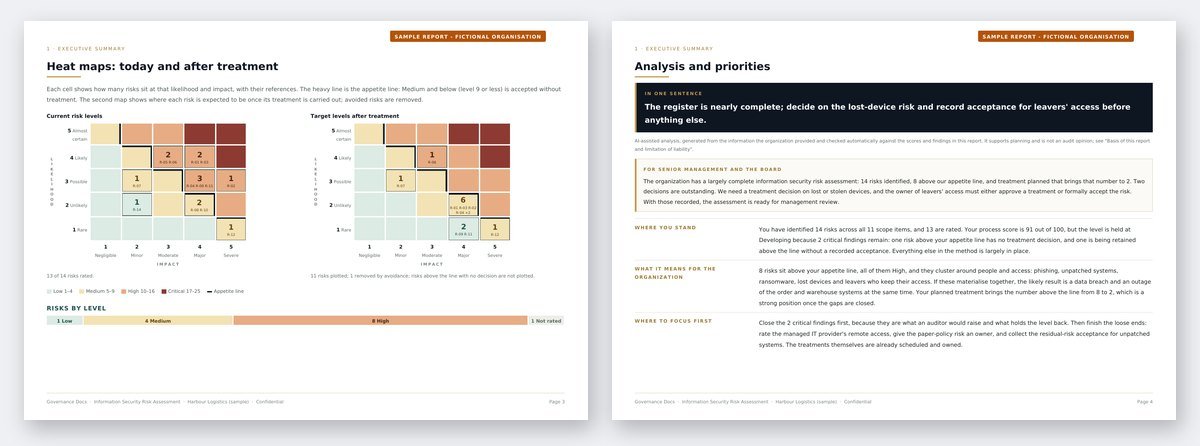
A worked sample for a fictional organization: the ranked risk register, heat maps before and after treatment, the treatment plan, every finding with the document that closes it, an AI-assisted analysis with a 30/60/90-day roadmap, plus the live Excel workbook with a Statement of Applicability starter.
Other free risk assessments: Privacy Risk Assessment (ISO 27701) Business Continuity Risk Assessment (ISO 22301) Enterprise Risk Assessment (ISO 31000) AI Risk Assessment (ISO 42001) Data Protection Impact Assessment (GDPR) Transfer Impact Assessment (GDPR) AI System Impact Assessment (ISO 42005) Legitimate Interests Assessment (GDPR) Third-Party Risk Assessment (ISO 27001)
What this tool covers
The five steps follow the order the standard sets out:
- Scope and criteria. Your likelihood and impact scales, each level with a written definition, and your appetite line: the highest risk level you accept without treatment. Clause 6.1.2 asks for criteria that give consistent, comparable results, and this is where they are recorded.
- What is in scope. The information, systems, people, suppliers, sites and processes risks can affect, each with an owner and a confidentiality, integrity and availability value.
- Risks. Each risk is a scenario: a threat that exploits a weakness and causes a consequence. Start from the library or write your own. Every risk gets a reference (R-01, R-02 and so on) and a risk owner.
- Analysis. The controls already in place, a likelihood and an impact rating against your definitions, and a short rationale. The level and the heat map update as you rate.
- Treatment. For every risk above the line: modify, avoid, share or retain. Planned controls with their Annex A references, a target level, an owner, a due date, and the risk owner’s acceptance of what remains.
What you get for free
As soon as you finish you see your heat map, your ten highest risks in priority order, and every finding an auditor would raise, from risks above the line with no treatment decision to scope items nobody has linked a risk to. Each finding names the risks it applies to, so you know exactly where to go back.
You also get a process score out of 100. It measures how complete and defensible the assessment is, not how risky your organization is: a register full of high risks with a clear, owned, dated treatment plan scores well; a tidy register nobody has made a decision about does not. Any critical finding holds the result at Developing until it is fixed.
Likelihood, impact and the appetite line
Each risk’s level is its likelihood multiplied by its impact, on a 5 by 5 matrix, so levels run from 1 to 25. By default 1 to 4 is Low, 5 to 9 Medium, 10 to 16 High and anything above that Critical, and Medium or below is acceptable without treatment. All of it is editable in step 1. Our guide to risk appetite covers how to choose the line.
The appetite line is what turns a list of ratings into decisions. A risk at or below it can be accepted as it stands. A risk above it needs one of the four treatment options, and if you decide to keep it anyway, the risk owner has to accept it formally, by name and date.
Where this fits
The risk assessment drives most of an ISMS. The controls you choose in treatment become your risk treatment plan, and comparing them with Annex A produces your Statement of Applicability. For the method in full, read our ISO 27001 risk assessment guide; for how it relates to the wider risk standards, see ISO 31000 vs ISO 27005.
If you are working on business continuity too, the free business impact analysis tells you which activities matter most and how quickly they must come back, and our article on BIA vs risk assessment explains how the two fit together.
Frequently asked questions
Is it really free?
Yes. The whole assessment, the heat map, the score, the top risks and the findings cost nothing. A free account is needed to view the results.
Do I have to finish in one sitting?
No. Every field saves the moment you enter it, and the assessment reopens where you left it, on the same device or on another one once you have an account.
How long does it take?
With the one-click starter set, a first pass over a dozen risks takes around 30 to 45 minutes. A full register of 30 to 50 risks, with rationale and treatment for each, is usually two or three sessions with the risk owners.
Should I rate risks before or after my existing controls?
After. Record the controls already in place, then rate the likelihood and impact as things stand today. The target level in step 5 is where you expect the risk to be once the planned treatment is done.
Does it follow ISO 27005?
It uses the scenario-based approach ISO/IEC 27005:2022 describes, where each risk is an event with its causes and consequences rather than a line per asset. That keeps the register short enough to manage at a small or mid-size organization while still linking every risk to the things it affects.
What happens to the information I enter?
It is stored with your assessment so you can come back to it, and it is never shared. If you would rather not have real system or supplier names here, use internal codes instead. You can delete an assessment permanently from your account at any time.
Is this a substitute for an independent assessment?
No. It is a self-assessment built from the information you enter, and Governance Docs does not review or verify it. It is designed to help you run the assessment properly and to show where it falls short of what the standard asks for.