CART
CIS Controls implementation starts with a decision CIS makes for you: every enterprise should start with Implementation Group 1. IG1 is 56 of the 153 Safeguards in CIS Controls v8.1, drawn from 15 of the 18 Controls — Controls 13 Network Monitoring and Defense, 16 Application Software Security and 18 Penetration Testing have no IG1 Safeguards at all — and CIS defines it as essential cyber hygiene, the foundational defences against the most common attacks.
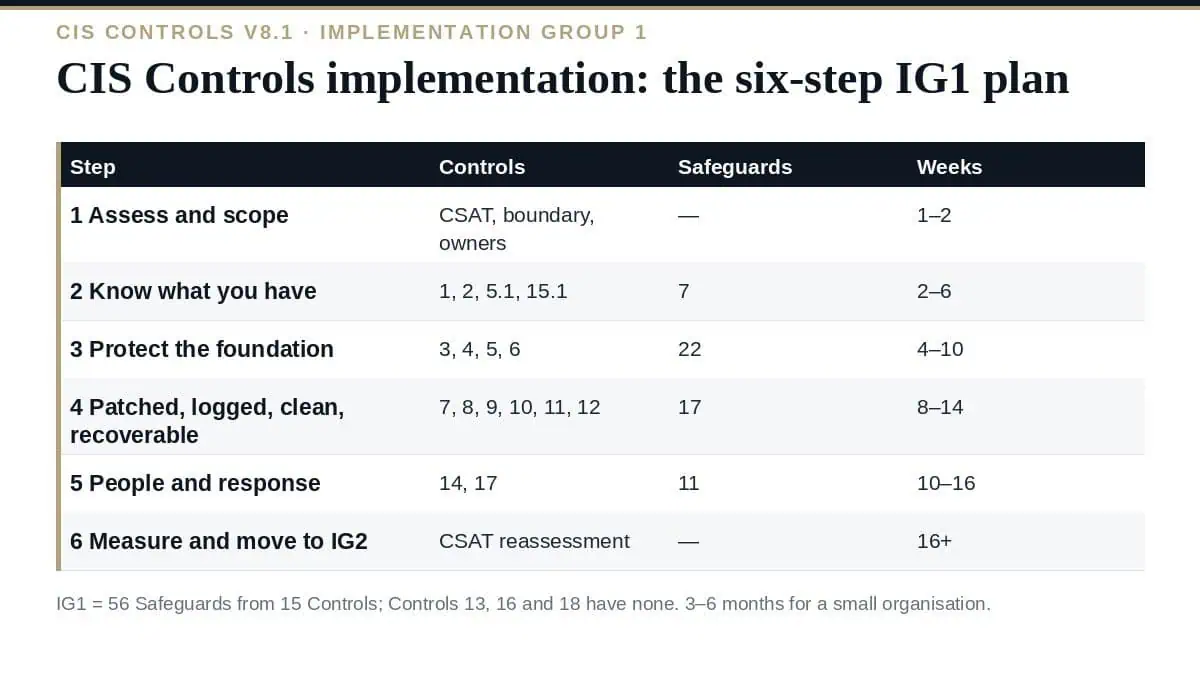
The Controls are ordered, so the plan is largely written already: inventory first, because nothing downstream can be secured if it is unknown; data, configuration, accounts and access next; vulnerability management, logging, malware and recovery after that; awareness, service providers and incident response last, running alongside. This guide sets out a six-step CIS Controls implementation plan for IG1, with the Safeguards in each step, the documents and tooling each needs, a realistic timeline for a small or mid-size organisation, the point at which IG2 starts, and the errors that stall the programme.
| Control | IG1 Safeguards | What they require |
|---|---|---|
| 1 Enterprise assets | 1.1, 1.2 | Detailed inventory reviewed bi-annually; process for unauthorised assets weekly |
| 2 Software assets | 2.1, 2.2, 2.3 | Software inventory reviewed bi-annually; only supported software authorised, reviewed monthly; unauthorised software removed or excepted monthly |
| 3 Data protection | 3.1–3.6 | Data management process; data inventory; access control lists; retention with minimum and maximum; secure disposal; encryption on end-user devices |
| 4 Secure configuration | 4.1–4.7 | Secure configuration processes for assets and network devices; session lock (15 min / 2 min mobile); firewalls on servers and end-user devices; secure management protocols; default accounts managed |
| 5 Account management | 5.1–5.4 | Account inventory; unique passwords; dormant accounts disabled after 45 days; administrator privileges on dedicated accounts |
| 6 Access control | 6.1–6.5 | Access granting and revoking processes; MFA for externally exposed applications, remote network access and administrative access |
| 7 Vulnerability management | 7.1–7.4 | Vulnerability management and remediation processes; automated OS and application patching monthly or more often |
| 8 Audit logs | 8.1–8.3 | Log management process; logs collected; adequate storage |
| 9 Email and browser | 9.1, 9.2 | Only supported browsers and email clients; DNS filtering |
| 10 Malware | 10.1–10.3 | Anti-malware deployed; automatic signature updates; autorun and autoplay disabled |
| 11 Data recovery | 11.1–11.4 | Recovery process; automated backups; protected recovery data; isolated instance of recovery data |
| 12 Network infrastructure | 12.1 | Infrastructure kept up to date |
| 14 Awareness | 14.1–14.8 | Programme plus training on social engineering, authentication, data handling, unintentional exposure, incident recognition and reporting, missing updates, insecure networks |
| 15 Service providers | 15.1 | Inventory of service providers |
| 17 Incident response | 17.1–17.3 | Designated incident personnel; contact information for reporting; enterprise reporting process |
Our guide to the CIS Controls v8.1 covers the full 18 and the three groups.
Set up CIS CSAT against v8.1 and IG1, define the enterprise boundary — every site, network and cloud tenancy — and assign an owner to each Control. Score honestly, with evidence; the result is the gap list the rest of the plan works through. Our guide to CIS Controls assessment covers the four scoring dimensions.
Safeguards 1.1, 1.2, 2.1, 2.2, 2.3, 5.1 and 15.1: the enterprise asset inventory with its required fields, the software inventory with support status, the account inventory and the service provider inventory. Use the discovery you already have — MDM, EDR, directory, cloud consoles — and record owners. This step finds the unmanaged devices, the unsupported software and the dormant accounts that every later Safeguard depends on knowing about. Our guide to the asset inventory covers Controls 1 and 2 in depth.
Controls 3, 4, 5 and 6 — 22 Safeguards. Write the data management process and inventory, set access control lists and retention, encrypt end-user devices; establish secure configuration processes and apply the CIS Benchmark baselines, session lock, host firewalls, secure management protocols and default-account handling; enforce unique passwords, disable dormant accounts at 45 days, separate administrator accounts; document access granting and revoking and turn on MFA for external applications, remote access and administration. Most of this is configuration on platforms already licensed; the documents are the policy-defined dimension.
Controls 7 to 12 — 17 Safeguards. Vulnerability and remediation processes with monthly automated OS and application patching; a log management process with collection and adequate storage; supported browsers and clients with DNS filtering; anti-malware with automatic updates and autorun disabled; a recovery process with automated, protected and isolated backups; network infrastructure kept current. The isolated backup instance (11.4) and DNS filtering (9.2) are the two most commonly missing at assessment.
Controls 14 and 17 — 11 Safeguards. A security awareness programme covering the seven IG1 topics, and incident response basics: a designated person and backup, contact information for reporting to authorities and partners, and an enterprise process for staff to report incidents. Both run in parallel with steps 3 and 4 because they belong to different people.
Reassess in CSAT, validate the evidence independently, and set the recurring calendar the Safeguards’ frequencies require. Then decide on IG2: if the organisation has dedicated IT staff supporting multiple departments, IG2’s 74 additional Safeguards are the next plan — starting with Control 8 log centralisation and retention, Control 7 scanning, Control 13 network monitoring and Control 16 application security, which are where IG2 adds most.
| Organisation | IG1 duration (our estimate) | Internal effort | What dominates |
|---|---|---|---|
| Small (25–100 users), managed cloud suite already in place | 3–4 months | 40–60 staff days | Documentation, MFA rollout, backup isolation, awareness |
| Small, unmanaged endpoints | 4–6 months | 60–100 staff days | Inventory, MDM or EDR deployment, configuration baselines |
| Mid-size (100–1,000 users) | 6–9 months | 150–300 staff days | Scale of inventory and configuration; multiple sites; IG2 planning in parallel |
Our guide to CIS Controls implementation cost covers what the effort and tooling cost.
| Safeguard | Document | Note |
|---|---|---|
| 3.1 | Data management process | Sensitivity, owners, handling, retention, disposal; reviewed annually |
| 4.1, 4.2 | Secure configuration processes for enterprise assets and for network infrastructure | Reviewed annually |
| 6.1, 6.2 | Access granting and access revoking processes | Preferably automated |
| 7.1, 7.2 | Vulnerability management process; remediation process | Risk-based remediation; reviewed annually |
| 8.1 | Audit log management process | Collection, review, retention; reviewed annually |
| 11.1 | Data recovery process | Scope, prioritisation, protection, isolation; reviewed annually |
| 14.1 | Security awareness programme | Onboarding and at least annual training; reviewed annually |
| 17.3 | Enterprise incident reporting process | Reporting to the designated personnel; reviewed annually |
| 1.1, 2.1, 3.2, 5.1, 15.1 | The five inventories | Assets, software, data, accounts, service providers |
Where should CIS Controls implementation start?
With Implementation Group 1 — CIS states every enterprise should start there — and, inside IG1, with Controls 1, 2, 5 and 15: the inventories of assets, software, accounts and service providers that every later Safeguard depends on.
How many Safeguards are in IG1?
56 of the 153 in v8.1, drawn from 15 Controls. Controls 13, 16 and 18 have no IG1 Safeguards; Control 14 has the most with eight.
How long does IG1 take?
Our estimate: 3–4 months and 40–60 staff days for a small organisation already on a managed cloud suite, 4–6 months with unmanaged endpoints, and 6–9 months for a mid-size organisation with multiple sites.
Do we need new tools for IG1?
Usually little: MFA, endpoint encryption, patching and basic logging are in mainstream platforms; the common additions are a backup solution with an isolated copy, DNS filtering and an awareness training platform.
When should we move to IG2?
When IG1 is complete and evidenced in CSAT, and the organisation has dedicated IT staff supporting multiple departments — IG2’s definition. Start IG2 with logging, vulnerability scanning, network monitoring and application security.
Run CIS Controls implementation in the order the Controls are numbered: assess and scope, build the five inventories, protect the foundation in Controls 3–6, keep it patched, logged, clean and recoverable in 7–12, run awareness and incident response alongside, then measure and decide on IG2 — because IG1’s 56 Safeguards are mostly process and configuration, and the plan fails only when someone buys the IG2 tools first.
The IG1 project plan, the eight process documents and five inventory templates the Safeguards require, the 18 Control policies and the Safeguard-level tracker are in the CIS Controls v8.1 Toolkit, or start with the free templates.

September 21, 2026
September 20, 2026
September 20, 2026
September 19, 2026

September 19, 2026

