PCI DSS payment page scripts are the JavaScript files that run in a customer’s browser on the page where card details are entered, and two requirements in PCI DSS v4.0.1 now control them: requirement 6.4.3 on managing the scripts, and requirement 11.6.1 on detecting unauthorized changes to the page. Both became effective on 31 March 2025. They exist because attackers have learned that injecting a few lines of code into a checkout page, often through a compromised third-party script, can skim card data without ever touching the merchant’s servers.
This guide explains what the two requirements ask for, who is affected, how the SAQ A eligibility change works, and how to build a practical control set with an inventory, an approval process and change detection. It draws on the PCI Security Standards Council’s own publications, and you should confirm the exact requirement wording in the current standard.
Free gap assessment
How much of PCI DSS v4 is actually in place?
Score all twelve requirements at sub-requirement level, free, including the ones that stopped being future-dated in 2025.
The PCI Security Standards Council describes e-skimming as a growing threat: scripts running in consumers’ browsers are a significant target for attackers seeking to steal payment card data. A typical checkout page loads code from many sources: analytics, tag managers, chat widgets, fonts, A/B testing and fraud tools. Each one runs with the same privileges as the page itself. If any of them is altered, the attacker can read what the customer types. Traditional server-side controls do not see this, which is why the standard added controls for the browser side.
What requirement 6.4.3 says
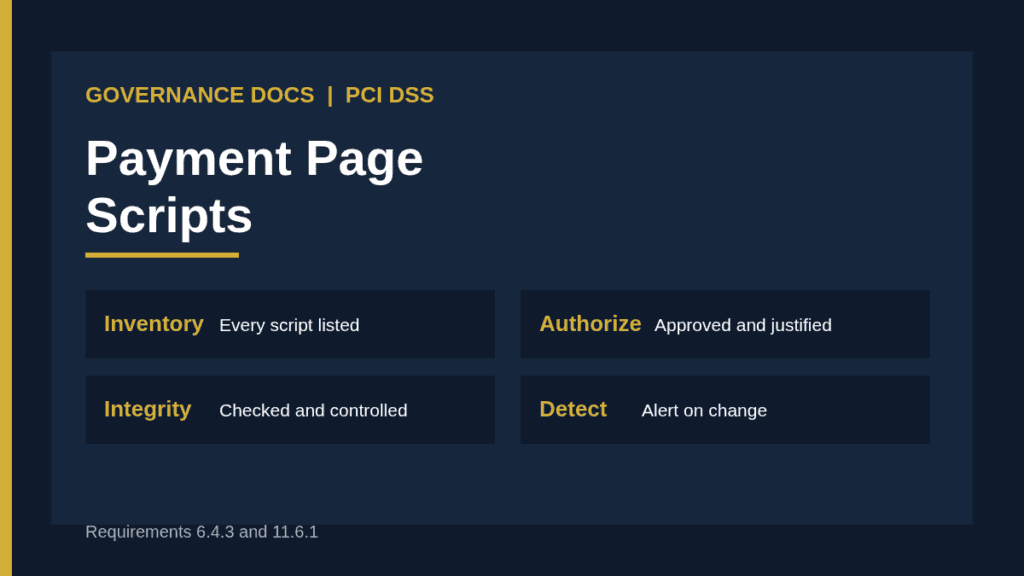
Requirement 6.4.3 concerns the management of scripts that are loaded and executed in the consumer’s browser on payment pages. In summary, it asks the entity to do three things. First, confirm that each script is authorized. Second, ensure the integrity of each script is assured. Third, maintain an inventory of all scripts with a written business or technical justification for why each is necessary. That means the entity knows what runs on the page, who approved it and why it is there.
What requirement 11.6.1 says
Requirement 11.6.1 is about change and tamper detection. In summary, the entity needs a mechanism that alerts personnel to unauthorized modification of the HTTP headers and the contents of payment pages as received by the consumer’s browser, and that evaluates the received page at least once every seven days or at the frequency defined in the entity’s targeted risk analysis. It complements 6.4.3: one controls what should be there, and the other checks that what arrives matches it.
Requirement
Purpose
Evidence to keep
6.4.3 authorization
Each script is approved before it runs
Approval records with names and dates
6.4.3 integrity
Scripts are checked so tampering is prevented or noticed
Technique used, configuration, test results
6.4.3 inventory
All scripts are listed and justified
Current inventory with owners and justifications
11.6.1 detection
Unauthorized changes to headers and page content raise an alert
Tool configuration, alerts, review records, frequency rationale
If you use a frequency other than weekly for the checks under 11.6.1, you need a targeted risk analysis to support it. Check the current standard for the exact conditions.
Who has to comply with the PCI DSS payment page scripts requirements
The Council’s information supplement on payment page security and preventing e-skimming is aimed at any entity that processes card transactions through e-commerce, or that has a webpage that can affect the security of e-commerce payments, including through embedded iframes. That covers merchants and third-party service providers. The supplement is guidance only, and it states that it does not add to, extend, replace or supersede the requirements in any PCI standard. You can read the announcement on the PCI Perspectives blog.
The SAQ A change
Merchants who validate with Self-Assessment Questionnaire A had a specific change. According to the Council, requirements 6.4.3 and 11.6.1 were removed from SAQ A, together with the related requirement 12.3.1 on targeted risk analysis, effective 31 March 2025. In their place, the eligibility criteria now require the merchant to confirm that its site is not susceptible to attacks from scripts that could affect the merchant’s e-commerce systems.
The Council’s announcement notes that the requirements remain part of PCI DSS itself. Read the full statement on the Council’s SAQ A announcement, and see our overview of the PCI DSS self-assessment questionnaires for how to choose the right one. If you cannot honestly make that confirmation, you may need a different validation route.
Building controls for PCI DSS payment page scripts step by step
Identify the payment pages. Include pages that display the form, pages with iframes or redirects to a payment provider, and pages that could affect their security. Our guide to PCI DSS scope explains how to decide what is in scope.
Build the script inventory. Load each page in a browser, list every script including those loaded by other scripts, and record source, owner, purpose and version.
Justify and authorize. For each script, record why it is needed and who approved it. Remove anything without a clear reason.
Choose integrity controls. Options include subresource integrity, a content security policy, hosting scripts you control, or a specialized monitoring tool. Choose what fits your architecture and record why.
Set up change detection. Configure a mechanism that checks the page and headers as a browser would receive them, and alerts on unauthorized differences.
Define response. Decide who receives alerts, how quickly they respond and how they distinguish an approved change from an attack.
Connect to change management. Every new script or update goes through approval and updates the inventory.
Document and test. Write the procedure, run a test with a harmless change and keep the results.
A worked example for PCI DSS payment page scripts
The following is a hypothetical illustration. An online retailer’s checkout page loads 23 scripts. The team maps them and finds that four are from tools that marketing dropped last year but never removed, two are loaded by a tag manager with no owner, and one loads code from a domain nobody recognizes. They remove the unused ones, assign owners to the rest, and write a one-line justification for each remaining script.
They move the payment fields into a provider-hosted iframe, restrict script sources with a content security policy, and add a monitoring tool that checks the page daily and alerts the security team. When a marketing vendor updates its widget, the alert fires, the team compares the change against the approval record, and confirms it was a routine update. They log the outcome and update the inventory. At the next assessment, they present the inventory, approval records and alert history.
Common mistakes with PCI DSS payment page scripts
Counting only first-party scripts. Most of the risk is in third-party and nested scripts.
One-time inventory. A list built at project start and never updated.
Tag manager blind spot. Allowing marketing to add scripts through a tag manager without approval.
Alerts nobody reads. A detection tool that sends alerts to an unmonitored mailbox.
Assuming an iframe removes the obligation. The merchant’s page still controls how the frame loads. Check the current guidance and your own eligibility.
No risk analysis for the frequency. Choosing a check interval without documented reasoning.
Working with vendors and marketing teams
Most script problems start outside the security team. Marketing adds tools to improve conversion, and vendors update their code without notice. Agree a simple rule: nothing goes on a payment page without an entry in the inventory, an owner and an approval. Ask vendors to tell you about changes in advance, and make script approval part of vendor onboarding. Review the inventory every quarter with the people who actually manage the site, and remove tools that no longer earn their place.
Documenting your PCI DSS payment page scripts program
Assessors will ask for the payment page inventory, the script inventory with justifications, the approval process, the integrity and detection configuration, alert and response records, and the targeted risk analysis where you use a different frequency. Our guides to PCI DSS v4.0 compliance and PCI DSS documentation cover the wider document set, and PCI DSS validation explains how the assessment is carried out. The PCI DSS Toolkit provides templates that you can adapt to your organization and its validation route.
PCI DSS payment page scripts FAQ
When did requirements 6.4.3 and 11.6.1 become effective?
31 March 2025, according to the PCI Security Standards Council.
Do these requirements apply if we use a hosted payment page?
It depends on your architecture and validation route. The Council’s SAQ A changes require merchants to confirm their site is not susceptible to script attacks. Ask your assessor or acquirer if you are unsure.
How often must payment pages be checked for changes?
At least once every seven days, or at the frequency in your targeted risk analysis, according to summaries of requirement 11.6.1. Check the standard for the exact wording.
What is e-skimming?
It is an attack in which malicious scripts on a web page capture payment card data as customers enter it.
Is the PCI information supplement mandatory?
No. It is guidance and says it does not add to or replace any requirement, but it explains what the Council expects.