

Policy Template: The Complete 2026 Format for Any Organization
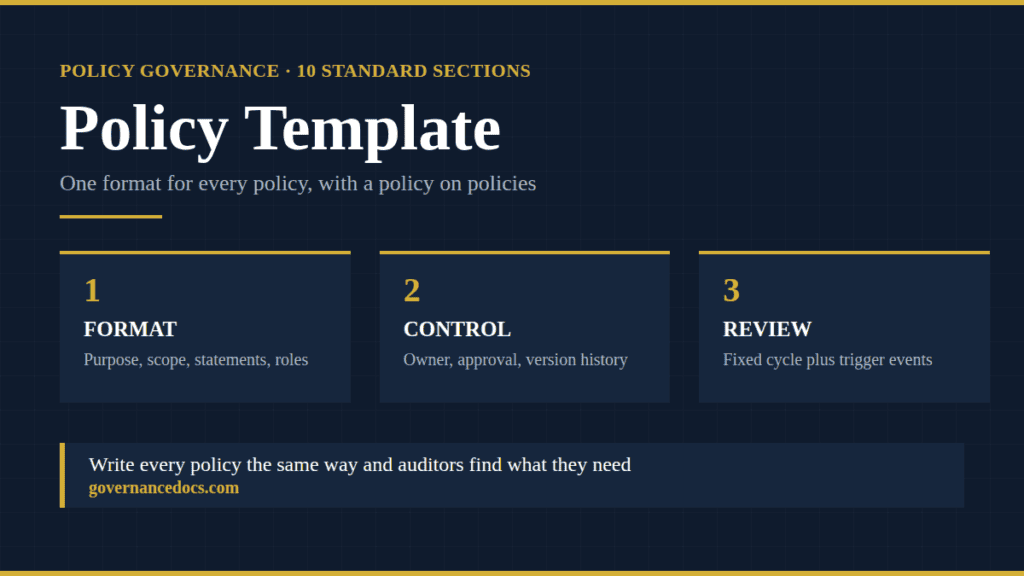
A policy template is the fixed skeleton that every policy in your organization follows: the same sections, in the same order, with the same document control block on page one. Build it once and every new policy is faster to draft, quicker to approve and easier to audit.
This guide gives you the ten standard sections, a complete fill-in version with example wording, the “policy on policies” that governs the whole set, and the Word setup that keeps version control honest.
Why one format beats twenty
Most organizations do not have a policy problem. They have a format problem. The access control policy came from a consultant, the expense policy from a former CFO, and the remote working policy from a search engine, so no two documents put the owner, scope or review date in the same place.
Reviewers waste time hunting for basics, staff cannot tell which version is current, and auditors find gaps: a missing review date or approval record is a finding however good the content is.
Standards expect this discipline. ISO/IEC 27001:2022 clause 7.5.2 requires documented information to carry identification (such as a title, date, author or reference number), a suitable format, and review and approval. Control 5.1 expects policies to be approved by management, published, communicated, acknowledged and reviewed at planned intervals. The NIST Cybersecurity Framework 2.0 says the same in its Govern function: GV.PO-01 asks for policy to be established, communicated and enforced, and GV.PO-02 for it to be reviewed and updated as requirements, threats, technology and mission change.
The 10 sections of a standard policy template
Every policy answers the same questions: why it exists, who it covers, what the rules are, who does what, and how it stays current. These ten sections cover them.
| # | Section | Question it answers | Typical length |
|---|---|---|---|
| 1 | Document control block | What is this, which version, who owns and approved it? | Table on page 1 |
| 2 | Purpose | Why does this policy exist? | 2–4 sentences |
| 3 | Scope | Who and what does it cover, and what is excluded? | 1 short paragraph |
| 4 | Definitions | What do the key terms mean here? | Only terms that need it |
| 5 | Policy statements | What must, should and may happen? | The bulk of the document |
| 6 | Roles and responsibilities | Who is accountable for what? | Short list or table |
| 7 | Compliance and enforcement | How is it monitored, and what are the consequences? | 1 paragraph |
| 8 | Exceptions | How does someone get approval to deviate? | 1 paragraph |
| 9 | Related documents | Which procedures, standards and laws connect to it? | List |
| 10 | Review and version history | When was it reviewed, what changed, who approved it? | Table |
Keep the policy itself short. A policy states what must happen and why. The step-by-step how belongs in a procedure, which can change without going back to the board.
Fill-in policy template with example wording
Copy the skeleton below into your document and replace the bracketed text. The example wording uses a remote working policy so you can see each section in a realistic form.
| Section | What to write | Example wording |
|---|---|---|
| Document control | Policy ID, title, version, owner (role, not name), approver, approval date, effective date, next review date, classification | POL-HR-004 | Remote Working Policy | v2.1 | Owner: Head of People | Approved by: Executive Committee | Approved: [date] | Next review: [date] | Internal |
| 1. Purpose | The outcome the policy protects, in one or two sentences | This policy sets the conditions under which employees may work away from [Organization] premises while protecting information, health and safety, and service quality. |
| 2. Scope | People, locations, systems and activities covered; explicit exclusions | This policy applies to all employees and contractors who work remotely for any part of their working time. It does not cover business travel, which is governed by POL-FIN-007. |
| 3. Definitions | Only terms a reader could misread | Remote working: performing contracted duties from a location other than an [Organization] office for one or more full or partial days. |
| 4. Policy statements | Numbered, testable rules using must, should and may | 4.1 Remote working must be agreed in writing with the line manager. 4.2 Company information must only be accessed from [Organization]-managed devices. |
| 5. Roles and responsibilities | Each role and what it is accountable for | Line managers approve arrangements. IT Services supports managed devices. Employees follow this policy and report incidents. |
| 6. Compliance | How compliance is checked and what non-compliance leads to | Compliance is monitored through device reports and annual manager attestation. Breaches may lead to disciplinary action under POL-HR-010. |
| 7. Exceptions | Who can grant one, how it is requested, how long it lasts, where it is logged | Exceptions must be requested in writing, approved by the policy owner, recorded in the exceptions register and reviewed at least every 12 months. |
| 8. Related documents | Procedures, standards, forms and external requirements | Remote Access Procedure (PRO-IT-012); Acceptable Use Policy (POL-IT-001); Home Workstation Self-Assessment form. |
| 9. Review | Review cycle and triggers | This policy is reviewed every 12 months and whenever legislation, technology or working patterns change significantly. |
| 10. Version history | Version, date, author, summary of changes, approver | v2.1 | [date] | Head of People | Added device requirement 4.2 | Executive Committee |
Writing policy statements that hold up
Policy statements are where most policy templates fail: they give a heading and no rules for what goes under it. Use these drafting rules:
- Use controlled verbs. “Must” is mandatory, “should” is expected unless there is a documented reason, “may” is permitted. Define them once in the policy on policies and never mix in “will try to”.
- One requirement per numbered statement. Auditors test statements individually, and so do your staff.
- Make each statement checkable. “Passwords must be strong” cannot be tested; “Passwords must meet the Password Standard (STD-IT-002)” can.
- Assign roles, not names. People leave; the Head of Finance role does not.
- Push the how into procedures. A sequence of steps belongs in a procedure the policy references.
For a worked example of this structure applied to a real governance topic, see our risk management policy guide, which walks through the eight sections an ISO 31000-aligned policy needs.
The policy on policies template
A policy on policies (sometimes called a policy framework or policy governance policy) is the one document that controls all the others. It says how policies are written, numbered, approved, published, reviewed and retired. Without it, the template is a suggestion; with it, the template is a rule.
| Section | What it decides | Example clause |
|---|---|---|
| Document hierarchy | The tiers of governance documents and what each may contain | [Organization] governance documents are, in order of authority: policies, standards, procedures and guidelines. A lower-tier document must not contradict a higher one. |
| Mandatory template | That every policy uses the approved template | All policies must be written using the approved policy template (TPL-GOV-001). Documents not in this format will not be submitted for approval. |
| Numbering scheme | How IDs are assigned so they never repeat | Policies are numbered POL-[function code]-[three-digit sequence]. Numbers are issued by the Policy Coordinator and are never reused, even after a policy is retired. |
| Approval authority | Who can approve each tier | Policies are approved by the Executive Committee; board-reserved policies (listed in Appendix A) by the Board. Procedures are approved by the policy owner. |
| Consultation | Who must review a draft before approval | Drafts must be reviewed by Legal and by every function with responsibilities under the policy. |
| Publication and acknowledgment | Where policies live and how staff confirm they have read them | Approved policies are published on the intranet policy library in PDF. Staff must acknowledge new and materially changed policies within 30 days. |
| Review cycle | How often and on what triggers | Each policy is reviewed at least every 12 months and when a law, regulation, risk assessment or audit finding affects it. |
| Exceptions | One exceptions process for all policies | Exceptions are requested on the Policy Exception Form, approved by the policy owner and recorded in the central exceptions register. |
| Retirement and archiving | How a policy is withdrawn and how long old versions are kept | Retired policies are marked “Withdrawn”, removed from the library and archived for [retention period]. |
Your policy on policies template should use the standard format, carry the lowest number in the set (such as POL-GOV-001) and be approved at the highest level. If you run several management systems, align it with your wider integrated document control system so one set of rules covers policies, procedures and records across every standard.
How to build a policy template for Word
Most organizations keep policies in Microsoft Word and publish PDFs. A proper policy template Word setup takes an afternoon and saves hours on every document after it. Follow these steps in order.
- Define styles first. Set Heading 1, Heading 2, Heading 3, Normal and a table style (Home > Styles). Never format headings by hand, or numbering and navigation will break.
- Link numbering to headings. Use a multilevel list (Home > Multilevel List > Define New Multilevel List) linked to Heading 1 and Heading 2 so sections and statements renumber automatically when you insert one.
- Create document control fields. Add custom properties under File > Info > Properties > Advanced Properties > Custom, such as PolicyID, Version, Owner, ApprovalDate and NextReview.
- Insert the fields where they appear. Use Insert > Quick Parts > Field > DocProperty to place each property in the document control table, header and footer. Change the value once and press F9 (or print preview) to update everywhere.
- Build the header and footer. Header: policy ID, title and classification. Footer: version, effective date, “Page X of Y” and the line “Uncontrolled when printed”.
- Add the version history table at the end, with columns for version, date, author, summary of changes and approver.
- Use content controls for placeholders. From the Developer tab, insert plain text content controls holding prompts such as “[State the outcome this policy protects]”.
- Save as a Word template (.dotx) and store the master in your document library, with editing restricted to the Policy Coordinator.
- Clean before publishing. Run File > Info > Check for Issues > Inspect Document to strip comments and tracked changes, then publish the approved version as PDF.
The result is a policy template for Word that enforces the format through the software, not reminders. Authors fill in fields; they do not redesign the document.
Mistakes that show up in audits
- No approval evidence. A typed name is weak. Keep minutes, an e-signature or a workflow record.
- Review dates in the past. One overdue review across a set of thirty policies suggests the review process is not working.
- Version numbers that disagree. The footer says v1.2, the history table says v1.3. DocProperty fields prevent this.
- Procedures inside policies. Forty-page policies change constantly, so they are always out of date or always awaiting approval.
If you are building an ISO 27001 policy set specifically, our ISO 27001 policy templates and examples guide shows which topic-specific policies the standard expects and how they map to Annex A.
Policy template FAQ
Is there a standard format for a policy?
There is no single legal format, but most organizations converge on the same sections: document control, purpose, scope, definitions, policy statements, roles, compliance, exceptions, related documents and version history. ISO 27001 prescribes no layout; it requires documents to be identified, reviewed, approved and controlled.
What is the difference between free policy templates and a full policy set?
Free policy templates usually give you one document in one format. A full set gives you every policy the framework expects, all built on the same template with consistent numbering, cross-references and document control, which is what an auditor reviews.
Do small organizations need a policy on policies?
Yes, though it can be one or two pages. Even a ten-person company benefits from agreeing who approves policies, how often they are reviewed and where the current versions live.
Our ISO 27001 Toolkit provides 165 editable templates built on one consistent policy format — including the Information Security Policy, the Access Control Policy and the Documented Information Control Procedure — for $99.
When a standard changes, know first
One email a month: edition changes, new deadlines, and what they mean for documentation you already have. No sales sequence.

Governance Docs
Governance Docs LLC
Recent Posts
November 27, 2026

November 27, 2026

November 26, 2026

November 26, 2026

November 26, 2026