CART
The Cyber Essentials requirements are five technical controls, published by the NCSC as the Requirements for IT Infrastructure and reissued each April — version 3.3 from April 2026, marked through the Danzell question set for certifications purchased from 27 April 2026. The five have not changed in name since the scheme began: firewalls, secure configuration, security update management, user access control and malware protection.
What changes is the detail beneath them — the 14-day patch rule, the password lengths, when MFA is mandatory, which devices and cloud services are in scope — and it is the detail that decides a pass. This guide sets out each of the five controls as v3.3 writes them, the numbers an assessor marks against, what moved in the 2026 version, the auto-fail conditions, and the evidence to have ready for each control before the questionnaire is opened.
| Control | Aim (v3.3) | Applies to |
|---|---|---|
| 1. Firewalls | Only secure and necessary network services can be accessed from the internet | Boundary firewalls, desktops, laptops, routers, servers, IaaS, PaaS, SaaS |
| 2. Secure configuration | Computers and network devices are configured to reduce vulnerabilities and provide only the services required | Servers, desktops, laptops, tablets, phones, thin clients, IaaS, PaaS, SaaS |
| 3. Security update management | Devices and software are not vulnerable to known issues for which fixes are available | Servers, desktops, laptops, tablets, phones, firewalls, routers, IaaS, PaaS, SaaS |
| 4. User access control | Accounts are assigned only to authorised individuals and give access only to what the role needs | Servers, desktops, laptops, tablets, phones, IaaS, PaaS, SaaS |
| 5. Malware protection | Execution of known malware and untrusted software is restricted | Servers, desktops, laptops, tablets, phones, IaaS, PaaS, SaaS |
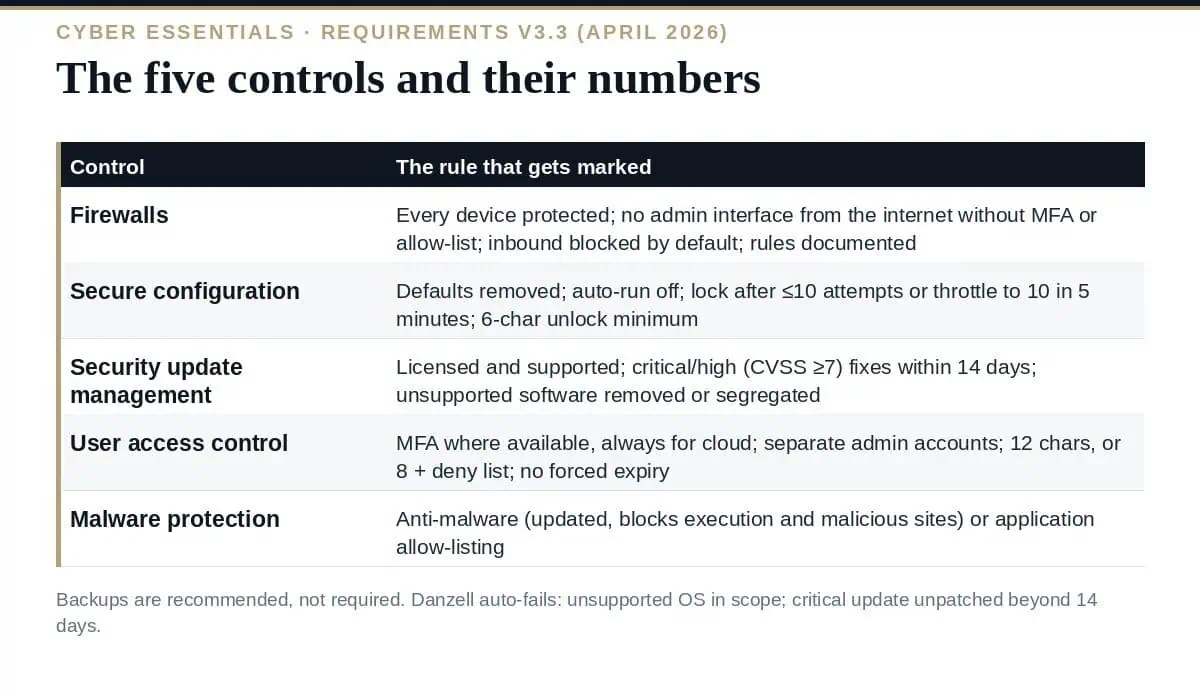
Every device in scope must be protected by a correctly configured firewall or a network device with firewall functionality; where the organisation does not control the network a device connects to — home and public Wi-Fi — a software firewall on the device does the job, and v3.3 advises turning on the built-in one. For every firewall: default administrative passwords changed to strong, unique ones or remote administration disabled; the administrative interface not reachable from the internet unless there is a documented business need and it is protected by MFA or an IP allow-list with managed passwords; unauthenticated inbound connections blocked by default; inbound rules approved and documented with the business need; and unnecessary rules removed when no longer needed.
Proactive management of computers and network devices: remove or disable unnecessary accounts (guest, unused admin), change default or guessable passwords, remove or disable unnecessary software and services, disable auto-run, authenticate users before access to organisational data, and lock devices for physically present users. Device unlocking credentials — biometric, password or PIN — must resist brute force: throttling to no more than 10 guesses in 5 minutes, or lockout after no more than 10 failed attempts; a minimum of 6 characters where the credential only unlocks the device, and the full password rules where it also authenticates.
All software in scope — operating systems, applications, firmware on firewalls and routers — must be licensed and supported, removed when it becomes unsupported (or scoped out via a sub-set with no internet traffic), set to update automatically where possible, and updated within 14 days of release where the update fixes vulnerabilities the vendor describes as critical or high risk, has a CVSS v3 base score of 7 or above, or where the vendor gives no severity. An update bundling several fixes is treated at the severity of its most serious fix. The scheme recommends, without mandating, that all updates go on within 14 days.
A process to create and approve accounts; unique credentials before access; accounts removed or disabled when no longer required, including after a defined period of inactivity; MFA implemented where available and always for cloud services; separate accounts for administrative activity, with no email or browsing from them; special privileges removed when no longer needed. Passwords are protected against brute force (the same 10-in-5-minutes or 10-attempt lockout), and their quality managed by one of: MFA; a minimum of 12 characters with no maximum; or a minimum of 8 characters with no maximum plus automatic blocking of common passwords via a deny list.
The password element of any MFA approach must be at least 8 characters. Regular expiry and complexity rules must not be enforced; users are supported with guidance (three random words), a password manager or secure storage, and a process to change a compromised password promptly. Passwordless methods — passkeys and FIDO2 authenticators, which the scheme treats as MFA, biometrics, security keys, push notifications, one-time codes — are recognised.
A malware protection mechanism active on every in-scope device, using at least one of two options. Anti-malware software (Windows and macOS servers, desktops and laptops) updated in line with the vendor, preventing malware from running, preventing execution of malicious code and preventing connections to malicious websites. Or application allow-listing (any device): only approved, code-signed applications execute, actively approved before deployment, with a current approved list and no ability for users to install unsigned or invalidly signed applications.
| Area | v3.3 / Danzell (from 27 April 2026) |
|---|---|
| Scope | Cloud services cannot be excluded; out-of-scope areas must be documented with the segregation explained; scope descriptions unlimited in length; legal entities named with addresses and company numbers |
| Third-party devices | Table 2 sets in/out by the user’s role: employee, volunteer, trustee and research-assistant BYOD in; student BYOD out; MSP, contractor and customer devices out |
| Software | The old web-applications wording is now software development: commercial web applications in by default, bespoke components out, pointing to the Software Security Code of Practice |
| Firmware | Firewall and router firmware explicitly within the security update requirement |
| Passwordless | Passkeys, FIDO2, biometrics, security keys, push and one-time codes defined; FIDO2 authenticators regarded as MFA |
| Plus retesting | Updates identified during the audit must be applied across the whole scope, not only the sampled devices |
| Marking | Several answers fail outright — an unsupported operating system in scope, a critical update unpatched beyond 14 days |
| Backups | Still not a technical requirement; strongly recommended |
Our guide to the Cyber Essentials questionnaire covers how the requirements become questions; Cyber Essentials scope covers the boundary they apply within.
| Control | Have ready | Where it usually fails |
|---|---|---|
| Firewalls | Firewall inventory, rule base with approvals and business need, admin interface exposure check, software firewall status on laptops | Remote admin open to the internet without MFA or allow-list; stale rules |
| Secure configuration | Build standard, account list with unused accounts removed, auto-run settings, device lock settings | Default passwords on network equipment; guest accounts enabled |
| Security update management | Patch report by device and firmware with release and install dates; unsupported software report at zero | Firmware never patched; one end-of-life OS in scope |
| User access control | Joiner/leaver process, admin account separation, MFA status per cloud service, password policy settings | MFA available but not enforced on a departmental cloud service; leavers’ accounts alive |
| Malware protection | Anti-malware deployment and update status per device, or the allow-list and its approval records | Servers and Macs without protection; allow-listing claimed but users able to install |
What are the five Cyber Essentials requirements?
Firewalls, secure configuration, security update management, user access control and malware protection — the five technical control themes in the NCSC’s Requirements for IT Infrastructure, currently v3.3 (April 2026).
How quickly must updates be applied?
Within 14 days of release where the update fixes critical or high-risk vulnerabilities, has a CVSS v3 base score of 7 or above, or the vendor gives no severity; automatic updates enabled where possible; unsupported software removed or segregated from the internet.
Is MFA mandatory?
Where available, yes, and always for authentication to cloud services. Administrative accounts and internet-accessible accounts should use it; the password element of an MFA approach must be at least 8 characters.
What are the password rules?
Brute-force protection (no more than 10 guesses in 5 minutes, or lockout after 10 attempts), and quality managed by MFA, a 12-character minimum, or an 8-character minimum with a common-password deny list — with no enforced expiry and no complexity rules.
Are backups a requirement?
No. Backing up is not a technical requirement of Cyber Essentials, though v3.3 highly recommends an appropriate backup solution.
Read the Cyber Essentials requirements as five controls with numbers attached: firewalls with documented rules and no exposed admin, configurations stripped of defaults and locked after 10 attempts, every critical fix within 14 days and nothing unsupported in scope, MFA on every cloud service with 12-character or deny-listed passwords, and anti-malware or allow-listing on every device. Then check each number against the estate before the questionnaire, because the marking under Danzell does not round up.
The five control policies written to v3.3, the patch management procedure with the 14-day rule, the access control and password standard, the firewall rule register and the evidence checklists are in the Cyber Essentials UK Toolkit, or start with the free templates.

September 21, 2026
September 20, 2026
September 20, 2026
September 19, 2026

September 19, 2026

