CART
Cyber Essentials scope decides the outcome of the assessment before a single technical question is answered, because every one of the five controls is marked against the boundary you declare. The Requirements for IT Infrastructure v3.3 (April 2026) set the default: the assessment “should cover the whole of the IT infrastructure used to carry out your organisation’s business, or if necessary, a well-defined and separately managed sub-set”, with the boundary defined by the business unit managing it, the network boundary and the physical location, and agreed with the certification body before assessment begins.
Everything else in the scoping rules is a consequence of that sentence — what a sub-set is, why cloud services can never be excluded, which devices used by third parties are in, and why home routers are usually out. This guide sets out the whole-organisation default and the sub-set alternative, the in/out rules device by device, the role-based table that most organisations get wrong, what Danzell changed in 2026, and how to write a scope description an assessor accepts.
| Option | What it means | Conditions |
|---|---|---|
| Whole organisation (default) | Every network, device, software asset and cloud service used for the organisation’s business | Achieves, in the scheme’s words, the best protection and maximises customers’ confidence; needed for the free cyber liability insurance |
| Sub-set | Part of the organisation whose network is segregated from the rest by a firewall or VLAN — used to define what is in or out | Well-defined, separately managed; the boundary (business unit, network boundary, physical location) stated; the partial scope justified to the assessor; the segregation real, because traffic across it is what the assessor asks about |
| Not acceptable | A scope that does not include end-user devices | Stated outright in v3.3: ‘A scope that doesn’t include end-user devices isn’t acceptable’ |
The requirements apply to every in-scope device and software that can accept incoming connections from internet-connected devices, can establish outbound connections via the internet, or controls the flow of data between those devices and the internet. A sub-set is legitimate when a genuinely separate environment exists — a segregated production network, a subsidiary on its own infrastructure — and a liability when it is drawn to leave out the awkward part of the estate: the certificate says what it covers, customers read it, and since Danzell the out-of-scope areas must be documented rather than left unmentioned. Our guide to Cyber Essentials certification covers why scope is where most failures start.
| Asset | In scope? | Rule (v3.3) |
|---|---|---|
| Organisation-owned laptops, desktops, tablets, phones, servers | In | The core of the scope; end-user devices can never be excluded |
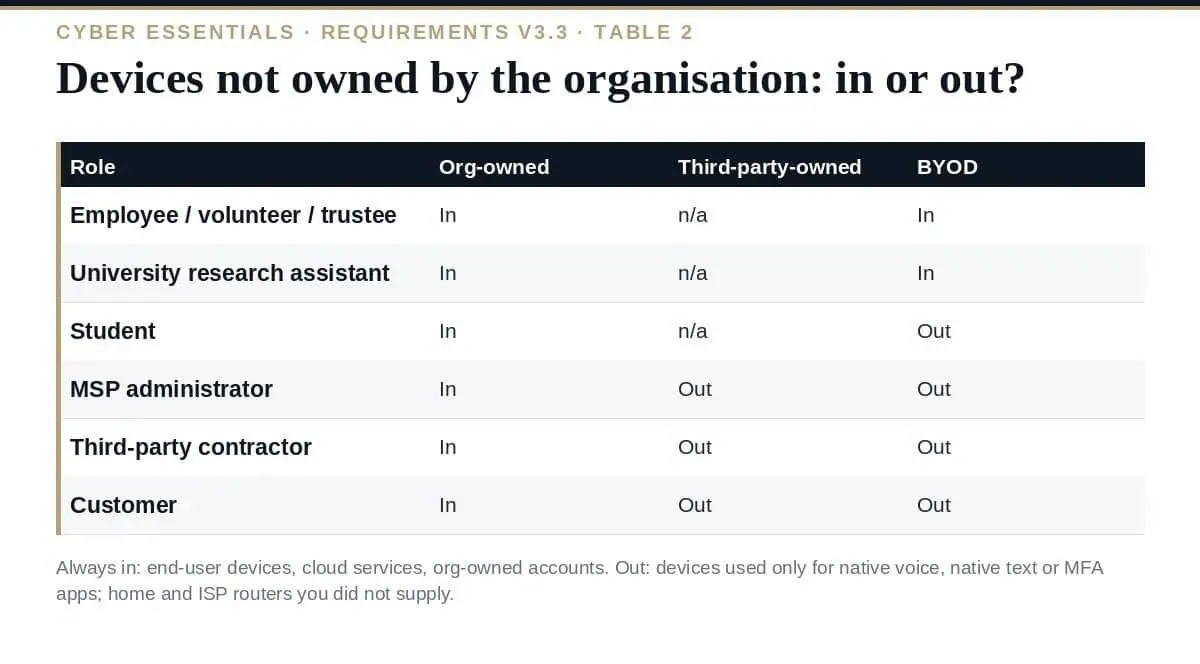
| BYOD used to access organisational data or services | In, by role | Employee, volunteer, trustee and university research assistant BYOD is in; student BYOD is out; MSP administrator, contractor and customer BYOD is out (Table 2) |
| Devices owned by a third party (MSP, contractor, customer) | Out | Table 2 — but you remain responsible for confirming they are configured correctly, outside the assessment |
| Organisation-owned devices loaned to a third party | In | ‘All end user devices your organisation owns that are loaned to a third party must be included’ |
| Mobile devices used only for native voice, native text or MFA apps | Out | The three named exclusions |
| Cloud services hosting organisational data or services (IaaS, PaaS, SaaS) | In — always | ‘Cloud services cannot be excluded from scope’; who implements each control varies by service type (Table 1), but the applicant is always responsible |
| Accounts used by third parties (MSP, supplier) on your infrastructure | In | All accounts your organisation owns are in scope, whoever uses them |
| Home and remote working devices, corporate or BYOD | In | The default approach; a router the organisation issues to the worker is in too |
| Home routers the organisation did not supply, ISP routers | Out | Firewall controls then apply on the device itself (software firewall); with a corporate VPN the boundary is the company firewall |
| Wireless access points | In if internet-reachable | Out if an attacker cannot attack via the internet, or if part of an ISP router at a home location |
| Commercial web applications (off the shelf) | In by default | Bespoke and custom components of web applications are out; the Software Security Code of Practice is pointed to instead |
| Unsupported software | Must be removed, or scoped out by a sub-set with no internet traffic | An unsupported operating system inside scope is an auto-fail |
Cloud being in scope does not mean you implement every control on it. v3.3 Table 1 sets the expectation by service type: for SaaS the provider implements firewalls, security update management and malware protection while you configure the service securely and always own user access control; for IaaS both parties share firewalls, configuration, updates and malware protection; for PaaS the provider takes most of firewalls and malware protection and shares the rest.
Where the provider implements a control on your behalf, the scheme requires that commitment to be in the contract or documents referenced by it — a security statement or shared-responsibility document from the provider’s trust centre. The practical answer for the questionnaire is a per-service list: service, type, which controls the provider covers, the document that says so, and the MFA enforcement setting, which is yours in every case.
Our guide to the Cyber Essentials questionnaire covers where these land in the question set.
What is the default Cyber Essentials scope?
The whole of the IT infrastructure used to carry out the organisation’s business. A well-defined, separately managed sub-set segregated by firewall or VLAN is permitted, with the partial scope justified to the assessor, but end-user devices can never be excluded and cloud services cannot be excluded.
Are personal devices in scope?
It depends on the user’s role, per v3.3 Table 2. BYOD used by employees, volunteers, trustees and university research assistants is in scope; student BYOD is out; devices owned by MSP administrators, contractors and customers are out. Devices used only for native voice, native text or MFA apps are out regardless.
Are home routers in scope?
Only if the organisation supplied them. Other home and ISP routers are out, which means the firewall control is met on the device with a software firewall; with a corporate VPN the internet boundary is the company firewall.
Can we exclude a cloud service?
No. Since v3.3 the requirements state that cloud services hosting organisational data or services cannot be excluded. Who implements each control depends on the service type, but user access control — including MFA — is always yours.
Does a sub-set scope get the insurance?
No. The £25,000 cyber liability cover is for organisations that certify their whole organisation and meet the other eligibility conditions.
Draw the Cyber Essentials scope from the default outward: whole organisation unless a genuinely segregated sub-set exists, end-user devices and cloud services always in, BYOD and third-party devices decided by the role table, home routers out unless you issued them — and then write it down in the detail Danzell now expects, reconciled to the inventory, so the assessor is agreeing with a description of your estate rather than discovering it.
The scope definition template with the role-based device table, the asset inventory, the cloud services register and the network boundary description are in the Cyber Essentials UK Toolkit, or start with the free templates.

September 21, 2026
September 20, 2026
September 20, 2026
September 19, 2026

September 19, 2026

