A user access review is the control that fails more audits than any other, and it fails for reasons that have nothing to do with security engineering. The mechanics are simple: pull a list of accounts, ask an owner whether each one is still appropriate, and remove the ones that are not. What organizations get wrong is proof. They run the review, they fix what they find, and then they cannot show the auditor a dated, complete, decision-by-decision record that the review actually happened.
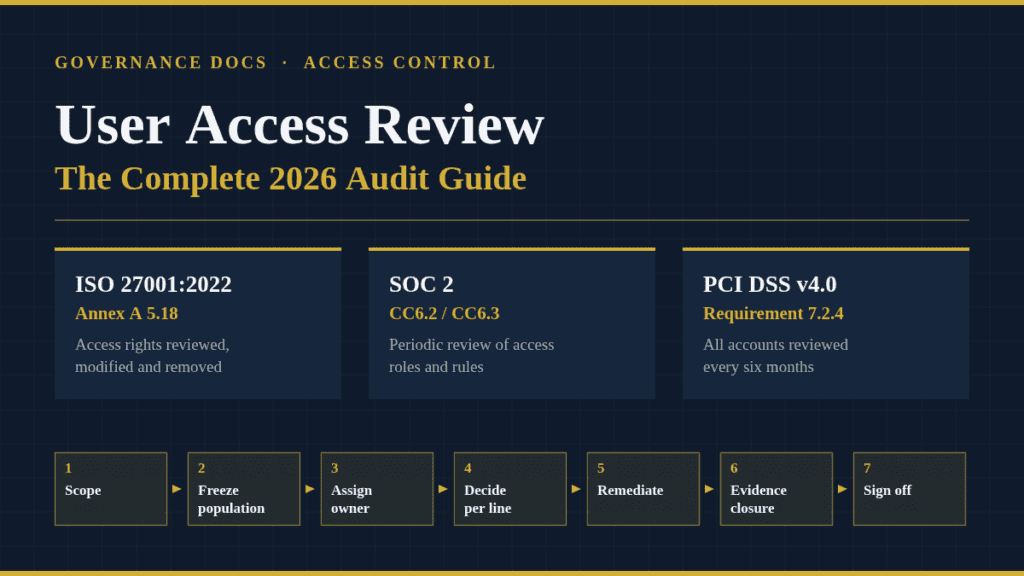
This guide covers what a user access review has to demonstrate, which clauses in ISO 27001, SOC 2, PCI DSS and HIPAA drive it, how often to run one, the seven-step process that survives audit scrutiny, and the mistakes that turn a genuine review into a finding.
Free gap assessment
Where do you actually stand against ISO 27001?
Score every management system clause and all 93 Annex A controls, free, and get a prioritised gap list back.
Every access control you deploy answers the question “can this person get in?” A user access review answers a different question: “should they still?”
The gap between those two is called privilege creep. Someone joins as a support engineer and gets read access to the production database. Eighteen months later they are in finance, they have kept the database access nobody remembered to remove, and they have picked up the accounting system on top. No control was bypassed. No alert fired. The account is exactly as it was provisioned, and it is exactly wrong.
An auditor testing this control is not asking whether your permissions model is elegant. They are testing three things:
Completeness — did the review cover every account in the system, including service accounts, contractors and vendor logins?
Independence — did somebody with business context make the decision, rather than the IT team approving its own access?
Closure — when the review said “remove this,” was it actually removed, and can you show when?
Miss any one of those and the user access review is decorative. Most failed reviews are performed diligently and evidenced badly.
Where the User Access Review Requirement Comes From
No single standard owns this control, which is part of why it gets neglected. It shows up in nearly every framework a mid-market company has to satisfy, usually under a different name.
Framework
Reference
What it requires
Stated frequency
ISO/IEC 27001:2022
Annex A 5.18 — Access rights
Access rights provisioned, reviewed, modified and removed per the access control policy
Not specified; annual is the accepted floor
ISO/IEC 27001:2022
Annex A 8.2 — Privileged access rights
Allocation and use of privileged access restricted and managed
Not specified; more frequent than standard accounts
SOC 2
CC6.2 / CC6.3
Authorize on registration, remove when no longer authorized, and periodically review the appropriateness of access roles and rules
“Periodic” — you define it, the auditor tests against it
PCI DSS v4.0.1
Requirement 7.2.4
Review all user accounts and access privileges, including third-party accounts, and address inappropriate access
At least once every six months
HIPAA Security Rule
45 CFR §164.308(a)(4)
Policies to authorize, establish, document, review and modify access to ePHI
Not specified in the rule
Two things are worth reading twice. First, only PCI DSS names a number. Everywhere else the frequency is yours to set — which means your own policy becomes the standard you are audited against. Write “quarterly” and miss a quarter, and you have a nonconformity you created yourself. Second, SOC 2 is an attestation performed by a licensed CPA firm, not a certification, and HIPAA is a legal obligation rather than something you get certified against. Neither issues a certificate you can hand a customer, but both will test this control hard.
If you are mapping controls across several of these at once, the full picture of how Annex A is organized is in our guide to the ISO 27001 Annex A controls, and the criteria structure behind CC6 is covered in the SOC 2 Trust Services Criteria. The requirement text for Annex A 5.18 itself sits in ISO/IEC 27001:2022, published in October 2022 and now the only certifiable edition following the close of the 2013 transition on 31 October 2025.
How Often Should You Run a User Access Review?
Reviewing everything quarterly sounds rigorous and usually produces worse outcomes than a risk-tiered schedule. Reviewers who face a 900-line spreadsheet four times a year stop reading it by the second round, and rubber-stamped approvals are worse than no review at all — you have manufactured evidence that the control operates when it does not.
Tier by blast radius instead:
Account type
Typical cadence
Why
Privileged and administrative
Quarterly
Highest impact if misused; smallest population, so the review stays readable
Standard workforce accounts
Semi-annual or annual
Volume makes quarterly review low-quality; the joiner-mover-leaver process carries the load between cycles
Third-party and vendor accounts
Semi-annual
PCI DSS 7.2.4 sets six months; these are the accounts nobody owns
Service and machine accounts
Annual, plus on system change
Rarely change, but they accumulate and almost never get deprovisioned
Terminations and role changes
Event-driven, within your stated SLA
Not a periodic review at all — a leaver still active at quarter-end is a finding regardless of the review schedule
These are typical practices, not mandates. Whatever you choose, put it in writing and then actually hit it. Set your access control policy to a cadence you can sustain in a quarter when two people are on leave.
The Seven-Step User Access Review Process
This is the sequence that holds up when an auditor walks it backwards.
1. Fix the scope before you pull data
List the in-scope systems and write down why each one is in or out. Anything holding regulated data, anything that can grant access to other systems, and anything your customers ask about in security questionnaires belongs in scope. Identity providers, code repositories and cloud consoles are frequently forgotten and are exactly where the damaging access lives.
2. Freeze a population and prove it is complete
Export the account list at a fixed point in time and capture how you got it — the query, the report name, the timestamp, the person who ran it. This is the step that separates a defensible review from an indefensible one. An auditor who cannot confirm the population was complete will not accept any of the decisions you made on it.
3. Assign the reviewer who has business context
The system owner or data owner reviews, not the IT administrator who provisions. IT approving its own grants is a segregation-of-duties failure in its own right, and it is one auditors specifically look for. The wider control set around this is covered in our guide to segregation of duties.
4. Give reviewers context, not raw identifiers
A line reading svc_acct_04 / db_writer gets approved because nobody knows what it is. Send job title, department, manager, the permission in plain language, last login date and the date access was granted. Reviewers reject far more when they can see that an account has not logged in for seven months.
5. Record a decision on every line
Retain, modify or revoke — with a reviewer name and a date against each one. Blank rows are treated as unreviewed, not as approved.
6. Remediate and evidence the closure
Every revocation needs a ticket, a completion timestamp and, ideally, an after-state export showing the account is gone. A review that identifies twelve stale accounts and removes nine of them is a worse audit outcome than one that finds nothing, because you have documented a known risk you left open.
7. Sign off and retain
A dated sign-off naming the reviewer, the population, the exceptions and the closure status. Keep at least three cycles — auditors sample historical periods, and SOC 2 Type 2 observation windows commonly run 3 to 12 months, so the cycle before last is very likely in scope.
The Evidence Your Auditor Will Ask For
When the request list arrives, it will look close to this:
The access control policy stating the review frequency and who reviews
The raw account export with a timestamp and the method used to generate it
The completed review file showing a retain, modify or revoke decision per account
Tickets or change records for every revocation, with completion dates
An after-state export or screenshot confirming removals took effect
Dated management sign-off
Termination records for the period, to test leaver removal against your SLA
Assemble this during the review, not afterwards. Reconstructing a user access review four months later from chat messages and memory is how well-run programs end up with qualified reports.
Five Mistakes That Turn a Clean Review Into a Finding
IT reviews its own access. The most common independence failure. Route administrator accounts to a security lead or business owner outside the IT function.
Population completeness is asserted, not evidenced. An undated screenshot of a user list proves nothing about what existed on the review date.
Everything is approved, every cycle, forever. A review that has never produced a single revocation across four cycles reads as a rubber stamp, and auditors will test a sample specifically to disprove it.
Revocations miss the stated SLA. Your policy says three business days; the tickets show eleven. The finding is the gap between what you wrote and what you did.
Service accounts are out of scope by convention. Nobody owns them, so nobody reviews them, so they keep standing privileges indefinitely. Assign each one a named human owner.
Frequently Asked Questions
Is a user access review mandatory under ISO 27001?
Annex A 5.18 requires access rights to be reviewed as well as provisioned, modified and removed. Annex A controls are applied based on your risk assessment and justified in the Statement of Applicability, which is mandatory under clause 6.1.3 — but excluding access rights review from an ISMS of any real scope is very difficult to defend to a certification body.
Free ISO 27001 risk assessment
Which of your risks sit above your appetite line?
Set your own risk criteria, pick from 61 information security risk scenarios, rate likelihood and impact, and decide how to treat each one. You get a heat map, a process score and the findings an auditor would raise, free.
Only PCI DSS v4.0.1 names a figure: at least once every six months for user accounts and access privileges, including third-party accounts, under Requirement 7.2.4. ISO 27001, SOC 2 and HIPAA leave the frequency to you. Quarterly for privileged access and semi-annual or annual for standard accounts is common practice.
Who should perform the user access review?
The owner of the system or the data it holds, with IT supplying the account data rather than approving it. For privileged accounts, route the review to someone independent of the team that holds the privileges.
Can a user access review be automated?
The data collection, reminders, ticketing and evidence retention can all be automated, and should be. The decision itself cannot — the point of the control is that a human with business context judges whether access is still appropriate. Automated approval workflows that default to “retain” after a timeout produce evidence that no review occurred.
Is access recertification the same thing?
Yes. “Access recertification,” “entitlement review,” “periodic access review” and user access review all describe the same control. Pick one term, use it consistently across your policy and evidence, and avoid confusing an auditor with three names for one process.
Where to Start
If you are building this from nothing, do one system first — your identity provider or your production cloud console — and run a complete cycle end to end, including sign-off and closure evidence. One system reviewed properly teaches you more about your own process gaps than five systems reviewed superficially, and it gives you a template to scale.
The documented pieces this control depends on — the access control policy, the review log, the reviewer sign-off record and the joiner-mover-leaver procedure — are all included in the ISO 27001 Toolkit, a set of 165 editable ISMS templates covering the full Annex A control set. It is a reasonable shortcut if you would rather adapt working documents than draft them from a blank page.