A ROPA review process is what separates a living record of processing from a spreadsheet written once for an audit and forgotten. Article 30 of the GDPR requires controllers and processors to keep records of their processing activities, but the article says nothing about how often to check them. That gap is where most records go stale, and stale records are the ones that embarrass organisations when a regulator asks to see them.
This guide sets out a practical ROPA review process: what to check, who should own each entry, which events should trigger an update outside the normal cycle, and what evidence shows the process is working.
Free gap assessment
Could you demonstrate GDPR compliance today?
Score yourself against what a supervisory authority actually asks for, free — the records, not the policy.
Article 30(4) says the records must be made available to the supervisory authority on request. A record that describes last year’s systems does not meet the purpose of the article, even if every column is filled in. Reviewing the record also has a useful side effect: it is often the first place a team discovers a new vendor, a new purpose or a data transfer that nobody assessed.
The record also feeds other obligations. Your privacy notice, your data subject request handling, your transfer assessments and your impact assessments all depend on knowing what processing actually takes place. If the record is wrong, each of those inherits the error. For background on what the record must contain, see our guide to records of processing.
What Article 30 requires a record to contain
Before you can review a record you need to know what a complete entry looks like. For controllers, Article 30(1) lists the following.
Article 30(1) element
What a reviewer checks
Controller and joint controller details
Names and contact details are current, including any representative or DPO
Purposes of processing
Each purpose still exists and is described specifically
Categories of data subjects and personal data
New data fields or groups of people have been added
Categories of recipients
New suppliers, partners or group companies are listed
Third-country transfers and safeguards
Destinations and transfer mechanisms are unchanged or updated
Envisaged erasure time limits
Retention periods match the current schedule
Security measures, where possible
The general description reflects current controls
Processors keep a shorter record under Article 30(2), organised around the processing carried out for each controller. The differences are explained in our comparison of controller and processor records. Article 30(3) requires the record to be in writing, including electronic form.
Free ROPA template and builder
Could you hand your records of processing to a regulator tomorrow?
Check whether Article 30 applies to you, add your processing activities from a library organized by department, complete every Article 30 content, and see which activities are missing a lawful basis, a transfer safeguard, a DPIA or an LIA. Free, with a record score and findings.
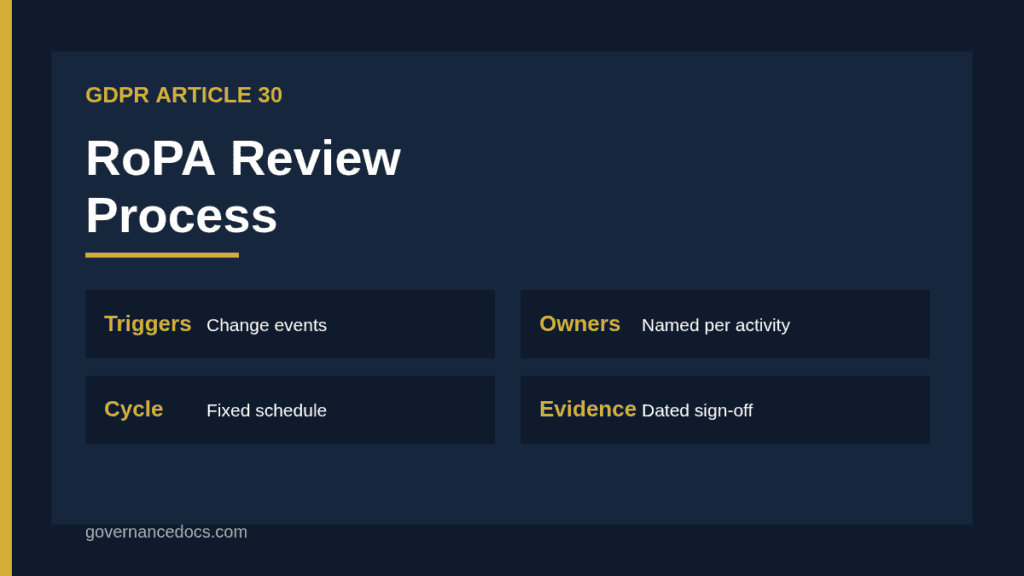
A workable ROPA review process has five parts: ownership, cycle, triggers, method and evidence. Keep each part short enough that people will follow it.
1. Assign an owner to every processing activity
The privacy team should own the process, but it should not own every entry. The person who runs the activity, such as the head of HR for payroll or the marketing lead for email campaigns, is the one who knows when it changes. Record that person’s name against each entry and make confirming it part of their role. Where ownership is shared, name one accountable person rather than a team mailbox.
2. Set a fixed review cycle
Article 30 does not prescribe a frequency, so choose one and write it down. An annual review of every entry is a common baseline. Higher-risk activities, such as those involving special category data, children or large-scale monitoring, deserve a shorter cycle, for example every six months. Whatever you choose, the process should state it and the record should show when each entry was last confirmed.
3. Define the events that trigger an early review
The calendar will always lag behind reality, so tie updates to events. Useful triggers include:
Procurement of a new system or supplier that will handle personal data.
A change of purpose or a new use of existing data.
A new country of processing or a new transfer mechanism.
A merger, restructure or change of controller details.
A data breach or audit finding that reveals a processing activity not in the record.
A change to retention periods or to the security architecture.
Build these into existing workflows, such as procurement checklists and change management tickets, so that the privacy team is told automatically rather than by chance.
4. Choose a review method
The simplest method is a confirmation round. Each owner receives their entries, checks them against the table above and either confirms them or marks changes. The privacy team then verifies a sample against reality, for example by comparing the supplier list in procurement with the recipients in the record. Sampling matters because owners tend to confirm what they last saw, not what is happening now. A structured data mapping exercise is a good way to refresh the underlying picture every few years.
5. Keep evidence of each review
Record the review date, the reviewer, the changes made and the sign-off. Keep the previous version so you can show how the record changed over time. An auditor or regulator will care less about the format than about whether the process visibly ran.
Common failures in a ROPA review process
Most weak processes fail in familiar ways. The record lists systems, not activities, so a change of purpose goes unnoticed. Entries describe recipients as “third parties” with no category. Retention says “as long as necessary” with no period. Security measures are copied from a policy and never checked. Owners are departed employees. And the review is done by one person from memory, with no confirmation from the business.
Another frequent gap is the boundary between the record and other documents. If your privacy notice says one thing and your record says another, one of them is wrong. Review them together, and check that any activity with a high risk to individuals also has an assessment. Our guide on when a DPIA is required helps you flag those entries.
Regulator expectations for ROPA review
The Article 30 wording is short, so regulator guidance fills in the practical detail. The UK Information Commissioner’s Office, for example, describes documentation as something that should be kept up to date and treats it as part of accountability; you can read its guidance on documentation under the UK GDPR. Other authorities publish templates and checklists of their own. Check the guidance of the authority that supervises you, as expectations on detail vary.
The small organisation exemption
Article 30(5) relieves organisations with fewer than 250 employees from keeping records, but only where the processing is occasional, unlikely to risk individuals’ rights and freedoms, and does not involve special category or criminal offence data. In practice, almost any organisation that employs staff or runs regular payroll processing will fall outside the exemption, because the processing is not occasional. Our post on the RoPA exemption explains the reasoning. If you rely on it, document why, and review that decision as part of your ROPA review process.
A hypothetical example of the ROPA review process
The following is a hypothetical example invented for illustration. A mid-sized software company keeps 40 processing activities in its record. In its annual ROPA review process, the privacy lead sends each department head their entries. The head of customer support confirms all six of hers. When the lead samples the supplier list, she finds that support has adopted a new chat tool that stores transcripts in a different country. The tool is not in the record and no transfer assessment exists.
The lead adds the recipient category and destination, opens a transfer assessment, updates the privacy notice and adds the tool check to the procurement form so the same gap does not recur. The confirmation round alone would have missed it; the sample caught it. That is the reason the process includes both.
Measuring whether the process works
A few simple measures show whether the ROPA review process is healthy. Track the share of entries confirmed within the cycle, the number of changes found per round, the number of gaps found by sampling that owners had missed, and the time between a trigger event and the record being updated. A round that finds no changes at all is not always good news; it may mean owners are confirming without looking.
Building a ROPA review process from a ready structure
If you would rather start from a completed structure than a blank sheet, the RoPA Report and Workbook gives you a record layout that maps to Article 30 with fields for owner, review date and status. Whether you use it or your own template, keep the same fields for every entry so the review can be run consistently and compared over time.
ROPA review process FAQ
How often should a RoPA be reviewed?
Article 30 sets no frequency. An annual review of all entries is a common baseline, with shorter cycles for higher-risk activities and early reviews when a defined trigger occurs. Write your chosen cycle into the process.
Who is responsible for keeping the record up to date?
The controller or processor is legally responsible. In practice the privacy team runs the process, but the person who runs each activity should confirm the entry and report changes.
Does the DPO have to maintain the record?
The GDPR does not require the DPO to maintain it. The DPO can advise and monitor, but many organisations keep the DPO independent of the record and assign upkeep to the business or privacy team.
What evidence shows the review took place?
Dated confirmations from owners, a change log, retained earlier versions and the results of any sampling. These show that the ROPA review process runs and is not only written down.
Can we review only the entries that changed?
No. Owners do not always report changes, so each entry should be confirmed on the cycle. Trigger events add early reviews on top; they do not replace the scheduled check.