CART
A NIST CSF organizational profile is the mechanism that turns the Cybersecurity Framework from a vocabulary into a plan. It states which CSF outcomes you are achieving today, which ones you intend to achieve, and how important each one is — and the difference between those two statements is your cybersecurity roadmap.
NIST sets out the method in SP 1301, the CSF 2.0 quick-start guide for creating and using organizational profiles, published in February 2024. This guide walks the five steps, the template columns, and the two mistakes that make a profile useless.
Free gap assessment
What does your CSF 2.0 Current Profile look like?
Score all 106 subcategories across the six functions, free, including the 31 under Govern that version 1.1 never asked about.
Run the free NIST CSF gap assessment → or View premium report sample
NIST distinguishes three things, and getting them straight saves an argument later:
The important consequence: if a community profile exists for your sector, your target profile should probably start there rather than from a blank sheet. A NIST CSF organizational profile is always yours; a community profile is the sector’s starting position that you adapt.
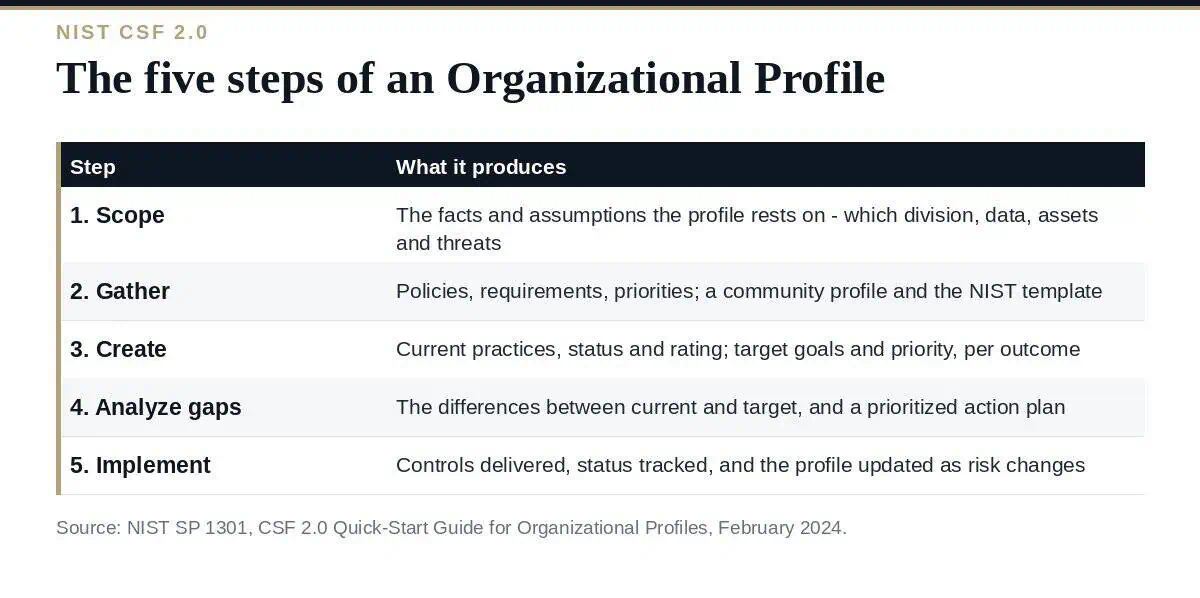
The scope defines the facts and assumptions the profile rests on. NIST is explicit that you can have as many profiles as you want, each with a different scope, and suggests scoping by technology category (IT, OT), data type (PII, PHI, PCI) or user population (employees, third parties). The questions to answer are why the profile exists, whether it covers the whole organization or named divisions and assets, whether it addresses all threat types, who develops and reviews it, and who sets expectations for achieving the target outcomes.
Scope determines whether a given CSF outcome even applies, so a vague scope produces a profile full of rows nobody can answer.
Organizational policies, risk management priorities and resources, cybersecurity requirements and standards. Two named sources are worth checking before you start typing: a relevant community profile, and NIST’s own organizational profile template.
NIST breaks this into five sub-steps: download and customize the template; include the outcomes that apply to your use case and record the rationale; document current practices in the Current Profile columns; document goals and plans in the Target Profile columns; and note the importance of each goal in the Priority field.
The template’s own columns tell you what a filled-in row looks like:
| Column | Belongs to | What goes in it |
|---|---|---|
| Identifier and Description | CSF outcomes | The function, category or subcategory — plus any outcome you add yourself |
| Practices | Current Profile | Policies, processes, procedures and evidence artifacts |
| Status | Current Profile | Whether the outcome is being achieved, and to what degree |
| Rating | Current Profile | An evaluation on a scale you choose — high/medium/low, 1–5, 0–100% |
| Priority | Target Profile | Relative importance of the outcome |
| Goals | Target Profile | The intended policies, roles and practices, drawn from informative references and new requirements |
NIST’s guidance on the template is unusually relaxed: add and remove columns as needed, the columns need not match between Current and Target, and you should record whatever information is significant in whatever format you prefer.
Comparing the two profiles produces the gaps; prioritizing the gaps produces the plan. This is the step that justifies the whole exercise, because it converts “we score 3 out of 5 on configuration management” into a funded piece of work with an owner. Gaps with longer remediation timelines can be tracked as plans of action and milestones.
The action plan is fulfilled through management, programmatic and technical controls, and the profile itself is used to track implementation status. NIST then closes the loop: controls and risks are monitored through key performance indicators and key risk indicators, risks beyond tolerance are surfaced through risk assessments, and any of that can prompt an update to the action plan, the profile or the risk tolerance statements.
Free ISO 27001 risk assessment
Which of your risks sit above your appetite line?
Set your own risk criteria, pick from 61 information security risk scenarios, rate likelihood and impact, and decide how to treat each one. You get a heat map, a process score and the findings an auditor would raise, free.
Run the free risk assessment → or View premium report sample
Both are avoidable, and both are common enough that a reviewer should check for them before a NIST CSF organizational profile goes to a steering group.
Rating everything the same. The defining feature of a target profile is prioritization — differing priorities across applicable outcomes, driven by strategic objectives, laws, regulations and risk responses. A profile where every outcome is “high” tells nobody what to resource and reduces to a compliance checklist.
Writing the current profile aspirationally. The Practices column asks for policies, processes and evidence artifacts. If the honest entry is that baselines exist but their use is neither monitored nor enforced, that is the entry — NIST’s own worked example says exactly that about configuration management. A current profile that describes intentions produces a gap analysis with nothing in it, and an action plan with nothing to do.
The profile is the CSF’s connective tissue. Informative references map each outcome to controls in frameworks you may already run — SP 800-53 control identifiers in NIST’s own example — which means an existing control set becomes the evidence behind a profile row rather than a competing exercise. Risk assessments under SP 800-30 feed likelihood and impact. Enterprise risk integration comes from IR 8286B. And CSF tiers, which describe how rigorous your governance and risk practices are, are a separate question from the profile and have their own quick-start guide.
If you already hold ISO 27001, the mapping runs the other way just as well: your Statement of Applicability is a control-level statement, while the profile is an outcome-level one. They answer different questions for different audiences, and maintaining both is less duplicative than it looks.
How many profiles should we have?
As many as the scopes you care about. NIST suggests separate profiles by technology category, data type or user population, and notes that overlapping profiles can be combined.
Is there an official template?
Yes — NIST publishes a CSF organizational profile template as an Excel spreadsheet on the CSF 2.0 website, designed for side-by-side comparison of current and target profiles.
What is the difference between a profile and a tier?
A profile records which outcomes you achieve and intend to achieve. A tier characterizes how your organization governs and manages cyber risk overall. They are complementary, and the tiers have a separate quick-start guide.
Do we need a community profile?
No, but check whether one exists for your sector before building a target profile from scratch — copying and adapting one is faster and gives you a defensible baseline.
Does a profile replace a risk assessment?
No. NIST is clear that risk assessment can occur at any time and can inform any step; the profile records outcomes, while the assessment sizes the risks that drive their priority.
A NIST CSF organizational profile is worth building only if it is honest and prioritized. Scope it narrowly enough that every row is answerable, start the target from a community profile where one exists, fill the current profile with what you can evidence rather than what you intend, and let the gap analysis produce a plan with owners and dates. Then use the same sheet to track implementation, because a profile that is updated is a management tool, and one that is filed is an artifact.
Profile, risk register and assessment templates are in the NIST Cyber Risk Management Toolkit, or start with the free ISO templates.

October 24, 2026
October 23, 2026
October 23, 2026
October 22, 2026
October 22, 2026

