CART
An asset inventory is the first CIS Control for a reason that is easy to state and hard to live with: you cannot defend, patch, monitor or decommission something you do not know exists. Controls 1 and 2 — enterprise assets and software assets — sit at the top of the list because everything below them silently assumes their output.
This guide covers what the two controls require, what belongs in the record, how to find the assets nobody registered, and why the inventory decays faster than any other security artifact.
Free gap assessment
Where do you actually stand against ISO 27001?
Score every management system clause and all 93 Annex A controls, free, and get a prioritised gap list back.
Run the free ISO 27001 gap assessment → or View premium report sample
Control 1, enterprise assets. Actively manage — inventory, track and correct — all enterprise assets connected to the infrastructure physically, virtually, remotely and within cloud environments. That covers end-user devices including portable and mobile, network devices, non-computing IoT devices and servers.
Control 2, software assets. Actively manage all software on the network so that only authorised software is installed and can execute, and unauthorised software is found and prevented from running.
The word doing the work in both is actively. A spreadsheet compiled last year is not active management; it is a historical record of what somebody believed at the time.
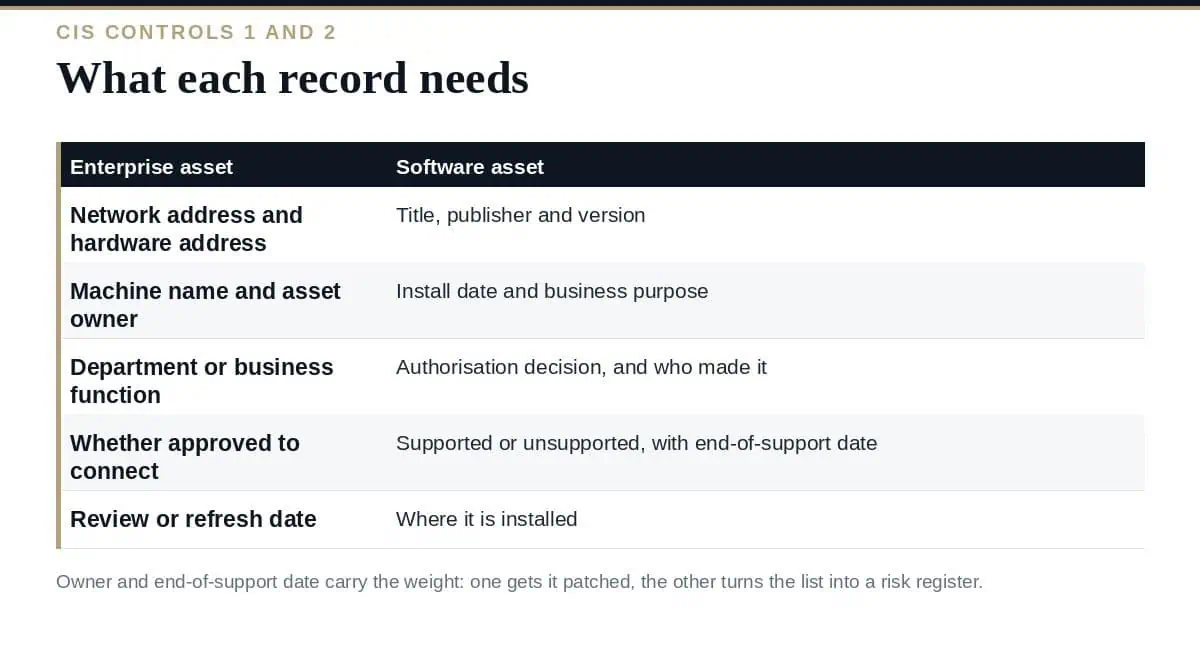
| Enterprise asset | Software asset |
|---|---|
| Network address and hardware address | Title, publisher and version |
| Machine name and asset owner | Install date and business purpose |
| Department or business function | Authorisation decision and who made it |
| Whether it has been approved to connect | Supported or unsupported, with end-of-support date |
| Review or refresh date | Where it is installed |
Two fields carry disproportionate weight. The owner, because an asset without one never gets patched or retired. And the end-of-support date, because unsupported software is what turns an asset inventory from a list into a risk register you can act on.
Free ISO 27001 risk assessment
Which of your risks sit above your appetite line?
Set your own risk criteria, pick from 61 information security risk scenarios, rate likelihood and impact, and decide how to treat each one. You get a heat map, a process score and the findings an auditor would raise, free.
Run the free risk assessment → or View premium report sample
Every organization’s inventory is incomplete, and the interesting question is where. Use more than one discovery method, because each is blind in a different way:
Reconcile the sources against each other rather than merging them. The gaps between them are the finding.
Inventory is only the first half of the software control. The second is doing something when unauthorised software appears — removing it, or preventing it running through allowlisting. Most organizations implement the detection and never close the loop, which leaves them with a very well-documented problem.
It is treated as a project. A discovery exercise produces an accurate inventory for about a week. Without joiners-movers-leavers, procurement and decommissioning feeding it, it degrades from the day it is finished.
Ownership is a team, not a person. “IT” owns nothing in practice. A named role per asset class is what makes the record maintainable.
Decommissioning has no trigger. Assets get added and never removed, so the inventory grows more inaccurate as it grows more complete-looking.
The scope excludes what matters. Contractor laptops, OT devices, developer cloud accounts and personal devices used for work are all in scope for the control and routinely out of scope for the process. Our guide to BYOD policy covers the last of those.
Which CIS Controls cover the asset inventory?
Control 1 for enterprise assets and Control 2 for software assets. Both sit in Implementation Group 1, meaning every organization is expected to do them regardless of size. Our guide to the 18 CIS Controls covers the groups.
How often should it be updated?
The safeguards call for review at least twice a year, or more often. In practice, automated discovery should run far more frequently and the review is what reconciles it.
Does this satisfy ISO 27001?
It goes a long way. ISO 27001 Annex A requires an inventory of information and other associated assets with ownership, so the same record serves both — the ISO framing simply extends beyond IT assets to information.
Do we need a CMDB?
No. A CMDB is one way to hold the data. A small organization can meet both controls with a well-maintained spreadsheet fed by automated discovery; the requirement is accuracy and ownership, not tooling.
What about cloud and SaaS?
Explicitly in scope. Cloud instances belong in the enterprise asset inventory and SaaS applications in the software inventory, which usually means pulling from provider APIs and from expense data rather than from the network.
Build the asset inventory from at least three discovery sources and treat the disagreements between them as the real output. Put a named owner and an end-of-support date on every record, wire the inventory into joiners, procurement and decommissioning so it maintains itself, and close the loop on unauthorised software rather than just detecting it. Then check the scope: contractor devices, OT and developer cloud accounts are where the assets you have never seen actually live.
Inventory templates, ownership matrices and the safeguard checklist are in the CIS Controls v8.1 Toolkit, or start with the free ISO templates.

October 24, 2026
October 24, 2026
October 23, 2026
October 23, 2026
October 22, 2026

